
| Download the amazing global Makindo app: ✅ Means NICE/National Guidelines 2026 compliant Android | Apple | |
|---|---|
| MEDICAL DISCLAIMER: Educational use only. Not for diagnosis or management. See below for full disclaimer. |
Computer Science A Level
A-Level Computer Science explores how computers work, how they are programmed, and how they impact society. The course combines practical problem-solving with theoretical understanding, encouraging logical thinking and algorithmic precision.
🧠 Key Topics Covered
- Programming: Python, Java or other languages; data types, control structures, procedures/functions, OOP (Object-Oriented Programming)
- Algorithms: Sorting, searching, recursion, divide and conquer, algorithm efficiency (Big O notation)
- Data Structures: Arrays, stacks, queues, linked lists, trees, graphs
- Computational Thinking: Abstraction, decomposition, logic, algorithms, pattern recognition
- Computer Systems: Architecture (Von Neumann model), fetch-decode-execute cycle, buses, registers, instruction sets
- Boolean Logic: Logic gates (AND, OR, NOT, NAND, NOR, XOR), truth tables, logic circuits
- Data Representation: Binary, hexadecimal, character sets (ASCII/Unicode), images, sound, compression techniques
- Networking: Protocols (TCP/IP, HTTP, DNS), topologies, the Internet, client-server and peer-to-peer models
- Operating Systems: Functions, memory management, scheduling, interrupts, user interfaces
- Databases & SQL: Relational databases, primary/foreign keys, queries, normalization
- Software Development: Life cycle models (waterfall, agile), testing, documentation, ethical issues
- Theory of Computation: Turing machines, finite state machines, regular expressions, computability
- Cyber Security: Threats, prevention, encryption, legislation (Computer Misuse Act, GDPR)
📊 Assessment Structure (Typical)
| Component | Description | Weighting |
|---|---|---|
| Paper 1 | Computer systems theory, networking, architecture, security | 40% |
| Paper 2 | Algorithms, programming, logic, computational thinking | 40% |
| Non-exam assessment (NEA) | Programming project: plan, design, build and evaluate a software solution | 20% |
🧩 Why Study A-Level Computer Science?
- Builds core problem-solving and programming skills
- Excellent preparation for university courses in Computer Science, Engineering, Mathematics
- Develops logical reasoning, abstraction, and resilience
- In-demand skills for careers in AI, software engineering, cybersecurity, and data science
📌 Tips for Success
- Practise coding regularly using platforms like Replit, Codewars, or LeetCode
- Understand theory deeply-don’t just memorise terms
- Draw diagrams for logic gates, finite automata, and algorithms
- Use past papers from AQA, OCR or Edexcel to revise
💻 Programming in A-Level Computer Science
Programming is at the heart of A-Level Computer Science. It focuses on writing efficient, logical code using languages such as Python, Java, or VB.NET. You'll develop computational thinking by solving problems using structured techniques.
🧾 Data Types
- Integer: Whole numbers (e.g. 3, -42)
- Float/Real: Decimal numbers (e.g. 3.14, -0.01)
- Boolean: TRUE or FALSE
- Character: A single alphanumeric symbol (e.g. 'A')
- String: A sequence of characters (e.g. "Hello, World!")
- Arrays/Lists: A collection of elements indexed by position
🔁 Control Structures
- Sequence: Code executes line by line in order
- Selection: Code branches using conditions (e.g.
if,elif,else) - Iteration: Repeating code blocks:
forloops – known number of iterationswhileloops – unknown iterations until a condition is false
🛠️ Procedures and Functions
- Subroutines: Named blocks of code that perform a task
- Procedures: Do not return a value (e.g.
def greet():) - Functions: Return a value (e.g.
def square(x): return x * x) - Benefits: Reusability, modularity, easier testing/debugging
🏗️ Object-Oriented Programming (OOP)
- Class: A blueprint for creating objects (e.g.
class Car:) - Object: An instance of a class with attributes (data) and methods (functions)
- Encapsulation: Hides internal details; uses getters/setters
- Inheritance: One class inherits attributes/methods from another
- Polymorphism: Same method behaves differently in different contexts
📌 Sample Python Snippet
# Example of class and method
class Dog:
    def __init__(self, name):
        self.name = name
    def bark(self):
        return f"{self.name} says woof!"
my_dog = Dog("Rex")
print(my_dog.bark())
📘 Tips for Programming Success
- Practise small coding tasks daily
- Understand error messages and debugging tools
- Break problems down into smaller sub-problems
- Use meaningful variable/function names
Exam Tip: You may be asked to write pseudocode, trace flowcharts, or spot logic errors in code. Practise with past paper coding questions from your exam board.
🔢 Algorithms in A-Level Computer Science
Algorithms are step-by-step procedures used to solve problems efficiently. At A-Level, you need to understand how common algorithms work, how to evaluate their efficiency, and how to implement them in pseudocode or code.
🔍 Searching Algorithms
- Linear Search: Checks each item in a list one by one.
- Used for unsorted lists.
- Time complexity: O(n)
- Binary Search: Repeatedly divides a sorted list in half.
- Requires list to be sorted.
- Time complexity: O(log n)
🔃 Sorting Algorithms
- Bubble Sort: Repeatedly swaps adjacent items if they are in the wrong order.
- Time complexity: O(n²)
- Easy to implement but inefficient for large lists.
- Insertion Sort: Builds a sorted list one element at a time.
- Time complexity: O(n²)
- Efficient for small or nearly sorted lists.
- Merge Sort: Divides the list, sorts sublists, and merges them.
- Time complexity: O(n log n)
- Uses recursion and extra memory.
- Quick Sort: Uses a pivot to partition the list and recursively sorts parts.
- Average time complexity: O(n log n)
- Worst case: O(n²) – when poorly chosen pivots
🌀 Recursion
- When a function calls itself to solve a smaller subproblem.
- Must have a base case to stop recursion.
- Examples: factorial, Fibonacci, tree traversal.
# Example: Recursive factorial in Python
def factorial(n):
    if n == 0:
        return 1
    else:
        return n * factorial(n - 1)
⚔️ Divide and Conquer
- Solves problems by dividing them into smaller subproblems, solving them recursively, and combining the results.
- Merge sort and binary search are classic examples.
- Often leads to efficient O(n log n) or O(log n) algorithms.
📉 Big O Notation
Big O expresses the worst-case time complexity of an algorithm, helping compare efficiency.
| Notation | Name | Example |
|---|---|---|
| O(1) | Constant time | Accessing an array element |
| O(log n) | Logarithmic time | Binary search |
| O(n) | Linear time | Linear search |
| O(n log n) | Log-linear time | Merge sort, quick sort |
| O(n²) | Quadratic time | Bubble sort, nested loops |
Exam Tip: Know how to trace through algorithms, justify efficiency with Big O, and write sorting/searching pseudocode. Use dry runs with trace tables to test your logic!
📦 Data Structures
Data structures are ways of storing and organising data to perform operations efficiently. They are essential for solving computational problems and writing scalable code.
🔢 Arrays
- Definition: Fixed-size collection of elements of the same type, accessed by index.
- Pros: Fast access (O(1)), simple structure.
- Cons: Fixed size, inserting/deleting elements can be inefficient (O(n)).
- Example:
arr[3]accesses the fourth element.
🗂️ Stacks (LIFO)
- Last In, First Out: Only the top item is accessible.
- Operations:
push(item),pop(),peek() - Used in function calls, undo features, syntax parsing.
- Time complexity: O(1) for push/pop
📬 Queues (FIFO)
- First In, First Out: Elements are removed in the order they arrived.
- Operations:
enqueue(item),dequeue() - Used in print queues, scheduling, and simulations.
- Time complexity: O(1) for enqueue/dequeue (if implemented efficiently)
🔗 Linked Lists
- Nodes: Each node contains data and a reference to the next node.
- Singly linked: Each node points to the next
- Doubly linked: Each node points to both next and previous
- Pros: Easy insertion/deletion
- Cons: Slower access (O(n))
🌳 Trees
- Hierarchical structure: Each node has children; one root node at the top
- Binary Tree: Each node has up to 2 children
- Binary Search Tree (BST): Left child < parent < right child
- Used in searching, hierarchies, file systems
- Traversals: In-order, pre-order, post-order
🌐 Graphs
- Nodes (vertices) and edges represent relationships
- Can be directed/undirected and weighted/unweighted
- Represented using adjacency lists or matrices
- Used in maps, social networks, routing algorithms
- Traversal: Depth-First Search (DFS), Breadth-First Search (BFS)
| Structure | Access Time | Insertion | Deletion | Use Case |
|---|---|---|---|---|
| Array | O(1) | O(n) | O(n) | Simple, fixed data |
| Stack | O(n) | O(1) | O(1) | Undo, call stack |
| Queue | O(n) | O(1) | O(1) | Scheduling, queues |
| Linked List | O(n) | O(1) | O(1) | Dynamic data |
| BST | O(log n) | O(log n) | O(log n) | Sorted data |
| Graph | Varies | O(1) | O(1) | Maps, networks |
Exam Tip: Learn how to implement and trace operations (like enqueue, insert, traverse) and compare time complexities using Big O.
🧠 Computational Thinking
Computational thinking is the problem-solving process that underpins programming and algorithm design. It involves thinking logically and efficiently to develop solutions that can be implemented by a computer.
🔍 Abstraction
- Definition: Removing unnecessary detail to focus on the essential aspects of a problem.
- Example: A satnav abstracts out unnecessary details (trees, buildings) and focuses only on roads and routes.
- Helps manage complexity and improve clarity in algorithm design.
🧩 Decomposition
- Definition: Breaking down a complex problem into smaller, manageable sub-problems.
- Each sub-problem can be tackled independently or by different team members.
- Common in software engineering (e.g. functions/modules).
♻️ Pattern Recognition
- Definition: Identifying similarities or trends in data or problems.
- Helps to apply solutions from one problem to another with similar patterns.
- Example: Recognising that bubble sort works the same for different data sets.
🔀 Algorithm Design
- Using logic and structured methods to plan a solution before coding.
- Involves sequence, selection, and iteration (control structures).
- Pseudocode and flowcharts are often used in the planning stage.
🔗 Logic
- Definition: Using Boolean logic to reason about conditions and operations.
- Logic gates (AND, OR, NOT, etc.) and truth tables are part of logical reasoning.
- Used for decision-making in algorithms and computer hardware.
| Concept | Purpose | Example |
|---|---|---|
| Abstraction | Focus on important details | Tube map shows only stations and lines |
| Decomposition | Simplify complex problems | Breaking a game into input, graphics, logic modules |
| Pattern Recognition | Identify repeated solutions | Detecting sorting patterns in lists |
| Algorithm Design | Create structured solutions | Designing pseudocode for a quiz app |
| Logic | Make decisions | Using if-else with Boolean expressions |
Exam Tip: You may be asked to identify or apply these concepts in unseen problem scenarios, so practise explaining them clearly with examples.
🖥️ Computer Systems
This topic explores how computers are structured internally and how they execute instructions. A strong understanding of architecture is essential for understanding how software interacts with hardware.
📐 Von Neumann Architecture
- Proposed by John von Neumann in the 1940s.
- Uses a single memory for both instructions and data.
- Based on a Control Unit, Arithmetic Logic Unit (ALU), Registers, and Memory.
- Sequential execution: instructions are processed one after another.
🔁 Fetch-Decode-Execute Cycle
- Fetch: The CPU gets the instruction from memory (RAM) into the Instruction Register.
- Decode: The Control Unit interprets the instruction using the Instruction Decoder.
- Execute: The instruction is carried out - e.g., arithmetic by the ALU, memory operations, branching.
This cycle repeats millions of times per second in modern processors (clock speed measured in GHz).
🔧 Registers
- Program Counter (PC): Holds the address of the next instruction.
- Memory Address Register (MAR): Holds the address to be fetched or written.
- Memory Data Register (MDR): Temporarily stores data read from or written to memory.
- Accumulator (ACC): Stores intermediate arithmetic/logic results.
- Instruction Register (IR): Holds the current instruction being decoded/executed.
🛣️ Buses
- Address Bus: Carries memory addresses from the CPU to RAM (unidirectional).
- Data Bus: Carries data between CPU, RAM, and other components (bidirectional).
- Control Bus: Carries signals to manage and control components (e.g., read/write signals).
📋 Instruction Sets
- Instruction set: The complete set of instructions a processor can execute (machine code).
- Types: Data movement (LOAD, STORE), arithmetic (ADD, SUB), control (JUMP, COMPARE), and logical (AND, OR).
- Each instruction typically consists of an opcode (operation) and operand (data/address).
| Component | Function |
|---|---|
| Control Unit (CU) | Directs operations within the CPU, controls data flow and timing. |
| ALU | Performs arithmetic and logical operations. |
| Registers | Fast storage for temporary values and instructions. |
| RAM | Holds both data and instructions. |
| Buses | Communication pathways between CPU and memory/devices. |
Exam Tip: Learn how to label and describe the steps of the fetch-decode-execute cycle and match instructions to appropriate registers and buses.
🔢 Boolean Logic
Boolean logic is a form of algebra in which all values are either true or false. It underpins decision-making in computing and digital electronics.
🧱 Logic Gates
- AND: True only if both inputs are true.
- OR: True if at least one input is true.
- NOT: Inverts the input (true → false, false → true).
- NAND: Opposite of AND (true unless both are true).
- NOR: Opposite of OR (true only if both are false).
- XOR: True if exactly one input is true.
📊 Truth Tables
Truth tables show the output for every possible input combination.
| A | B | AND | OR | NAND | NOR | XOR |
|---|---|---|---|---|---|---|
| 0 | 0 | 0 | 0 | 1 | 1 | 0 |
| 0 | 1 | 0 | 1 | 1 | 0 | 1 |
| 1 | 0 | 0 | 1 | 1 | 0 | 1 |
| 1 | 1 | 1 | 1 | 0 | 0 | 0 |
🔄 NOT Gate
| A | NOT A |
|---|---|
| 0 | 1 |
| 1 | 0 |
🧩 Logic Circuits
- Logic circuits are built by combining gates to represent Boolean expressions.
- Example: Q = (A AND B) OR (NOT C) - combine AND, NOT, and OR gates accordingly.
- Used in CPUs, calculators, control systems, and digital electronics.
🧠 Key Skills
- Draw logic circuits from Boolean expressions and vice versa.
- Simplify logic expressions using Boolean algebra (e.g. A + A = A).
- Evaluate outputs for given circuits using truth tables.
Exam Tip: Practise drawing logic circuits and writing expressions like Q = A⋅B + ¬C. You may be asked to simplify or interpret them under timed conditions.
💾 Data Representation
Computers store and process all data using binary. Understanding how different types of data are represented is essential in computer science.
🔢 Binary & Hexadecimal
- Binary (base 2): Uses only 0s and 1s. Each digit (bit) doubles in value from right to left (1, 2, 4, 8, etc.).
- Hexadecimal (base 16): Easier for humans to read than long binary strings. One hex digit = 4 binary bits.
- Example: Binary
11001100= HexCC.
🔡 Character Sets
- ASCII: 7-bit code representing 128 characters (letters, digits, symbols).
- Extended ASCII: Uses 8 bits to represent 256 characters (adds accented characters).
- Unicode: Supports thousands of characters and symbols from multiple languages worldwide.
🖼️ Images
- Images are made of pixels; each pixel has a binary value for colour (bit depth).
- Resolution: Number of pixels in an image (width × height).
- Bit depth: Number of bits used per pixel - e.g., 8-bit allows 256 colours.
- Image file size = width × height × bit depth (in bits).
🔊 Sound
- Sound is recorded as samples of amplitude at regular intervals (sample rate).
- Sample rate: Number of samples taken per second (measured in Hz).
- Bit depth: Number of bits used to store each sample.
- File size = sample rate × bit depth × duration (× number of channels).
🗜️ Compression
- Lossy compression: Permanently removes data (e.g. JPEG, MP3) - reduces quality but saves space.
- Lossless compression: No data lost; can fully restore original (e.g. ZIP, PNG).
- Used to reduce file sizes for faster transfer and lower storage needs.
| Data Type | Representation | Key Terms |
|---|---|---|
| Text | Binary codes using ASCII or Unicode | Character set, encoding |
| Images | Pixels stored as binary values | Bit depth, resolution |
| Sound | Binary samples of analogue waves | Sample rate, bit depth |
| Compression | Reduces file size using algorithms | Lossy, lossless |
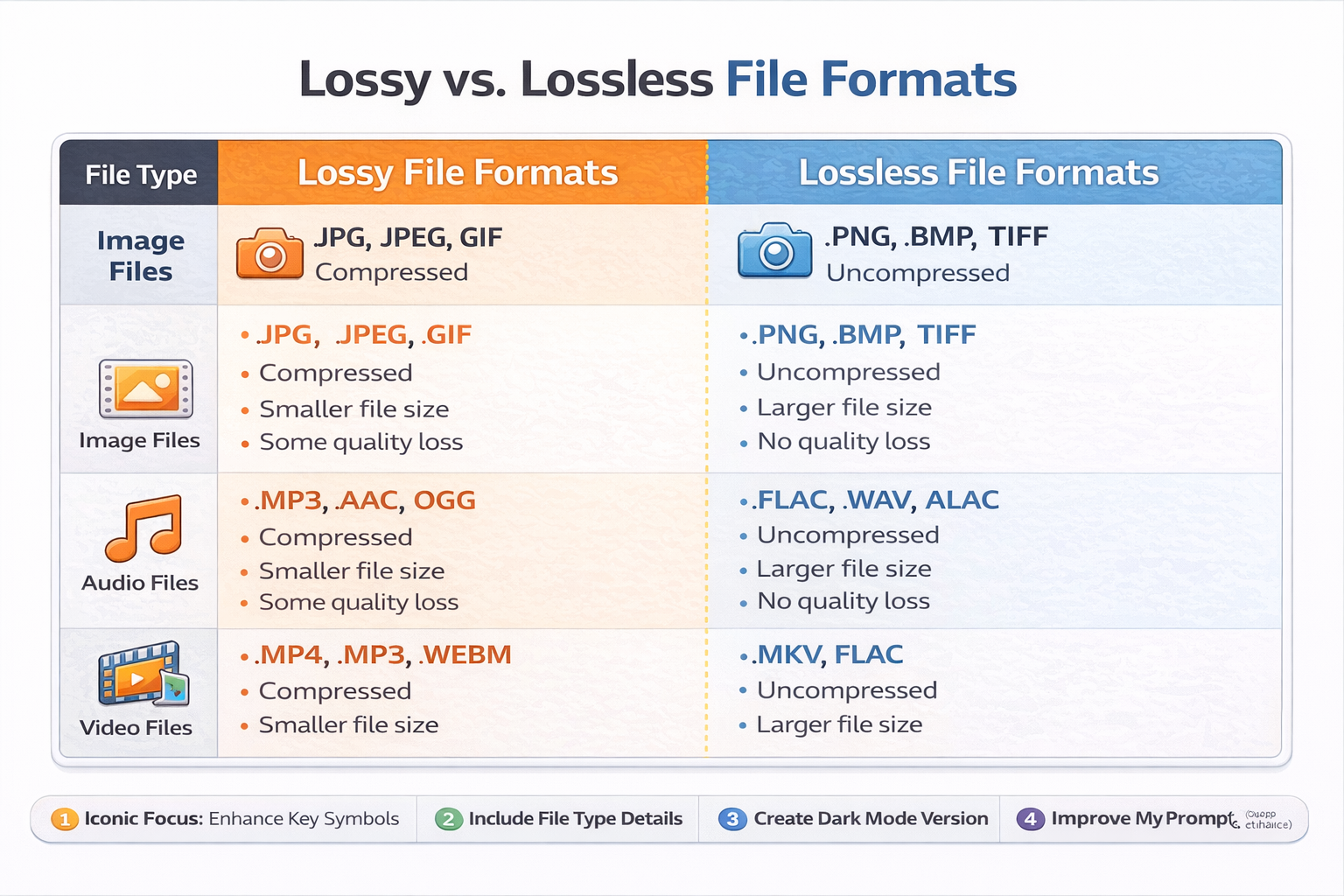
Exam Tip: Practise binary/hex conversions and learn how to calculate image and sound file sizes. Know when lossy vs lossless compression is appropriate.
🌐 Networking
Computer networks enable devices to communicate and share data. Understanding the structure and operation of networks is essential in computing.
📡 Network Protocols
- TCP/IP: A suite of protocols used for communication over the internet.
- TCP (Transmission Control Protocol): Ensures data is delivered reliably and in order.
- IP (Internet Protocol): Handles addressing and routing of packets between devices.
- HTTP/HTTPS: Used by web browsers to access websites (HTTPS is secure with encryption).
- DNS (Domain Name System): Converts domain names (e.g., google.com) into IP addresses.
- FTP (File Transfer Protocol): Used to transfer files between computers over a network.
🗺️ Network Topologies
- Star: All devices connect to a central switch/hub. Reliable but costly and hub-dependent.
- Bus: All devices share a single communication line. Cheap but prone to collisions and failures.
- Mesh: Devices are interconnected, offering redundancy and robust communication.
🌍 The Internet
- A global network of networks using TCP/IP protocols.
- Relies on routers to direct data packets across different networks.
- Web services, email, file transfer, and video streaming all use the internet infrastructure.
🖥️ Network Models
- Client–Server: Clients request services (e.g., files, web pages) from a central server. Easier to manage and secure.
- Peer-to-Peer (P2P): Devices communicate directly and share responsibilities. No central server; common in file sharing.
| Topology | Pros | Cons |
|---|---|---|
| Star | Reliable, easy to add devices | Switch failure disables entire network |
| Bus | Low cost, simple layout | High risk of collisions and difficult troubleshooting |
| Mesh | High reliability and redundancy | Expensive and complex to set up |
Exam Tip: Know which protocol belongs to which layer of the TCP/IP model and when to use each topology or model (client-server vs P2P).
🖥️ Operating Systems (OS)
An operating system is the software that manages hardware and software resources, and provides services for computer programs. It acts as an intermediary between users and the computer hardware.
🔧 Key Functions
- Memory Management: Allocates RAM to processes, manages virtual memory and paging.
- Process Management: Controls execution of processes using scheduling algorithms.
- File Management: Organises files and directories, handles read/write access, and permissions.
- Input/Output (I/O) Management: Manages communication with peripherals (keyboard, disk, etc.).
- Security: Controls user access, manages authentication and permissions.
💾 Memory Management
- Ensures each process has enough memory and prevents interference between processes.
- Paging: Divides memory into fixed-size pages to manage RAM efficiently.
- Virtual Memory: Uses hard disk space when RAM is full, allowing more programs to run.
⏱️ Scheduling
- Purpose: Determines the order in which processes access the CPU.
- Types of scheduling:
- Round Robin: Each process gets a fixed time slice.
- First-Come First-Served (FCFS): Executed in order of arrival.
- Shortest Job First (SJF): Prioritises tasks with shortest completion time.
🚨 Interrupts
- Signals sent to the CPU to gain its attention, allowing it to pause the current process and deal with a higher priority task (e.g. input from mouse).
- After handling the interrupt, the CPU resumes the previous task.
- Essential for multitasking and responsive systems.
🧑💻 User Interfaces
- Command-Line Interface (CLI): Text-based; requires knowledge of commands (e.g. Linux Terminal).
- Graphical User Interface (GUI): Visual, user-friendly interface (e.g. Windows, macOS).
- Menu-Driven Interface: Uses structured menus; common in ATMs and mobile devices.
- Voice/User Interface: Enables interaction via speech or gestures (e.g. Siri, Alexa).
| Component | Description | Example |
|---|---|---|
| Memory Manager | Allocates RAM, uses paging and virtual memory | Allows multitasking |
| Scheduler | Controls CPU time among processes | Round Robin |
| Interrupt Handler | Pauses/resumes tasks based on priority signals | Keyboard interrupt |
| User Interface | Provides interaction between user and OS | GUI, CLI |
Exam Tip: Be ready to describe how memory management and interrupts work, and compare different scheduling algorithms with pros and cons.
🗄️ Databases & SQL
Databases are structured collections of data. A relational database organises data into tables (relations), with each table representing an entity.
🔗 Relational Databases
- Data is stored in tables with rows (records) and columns (fields).
- Relationships between tables avoid duplication and ensure data integrity.
- Each table typically represents one entity (e.g.,
Students,Courses).
🔑 Keys
- Primary Key: Uniquely identifies each record in a table. Must be unique and not null.
- Foreign Key: A field in one table that links to the primary key in another. Enables relationships.
- Composite Key: A combination of two or more fields that together uniquely identify a record.
🧪 SQL (Structured Query Language)
- SELECT: Retrieves data from a table.
SELECT name, age FROM Students WHERE age > 16; - INSERT: Adds new data.
INSERT INTO Students (name, age) VALUES ('Anna', 17); - UPDATE: Modifies existing data.
UPDATE Students SET age = 18 WHERE name = 'Anna'; - DELETE: Removes data.
DELETE FROM Students WHERE age < 16; - JOIN: Combines rows from related tables using keys.
SELECT Students.name, Courses.title
FROM Students
JOIN Enrolments ON Students.ID = Enrolments.StudentID
JOIN Courses ON Enrolments.CourseID = Courses.ID;
📏 Normalisation
- Goal: Reduce redundancy and improve data integrity.
- 1NF: Remove repeating groups; ensure atomicity (single values per field).
- 2NF: Remove partial dependencies (applies to composite keys).
- 3NF: Remove transitive dependencies (non-key fields must depend only on the primary key).
| Concept | Description | Example |
|---|---|---|
| Primary Key | Unique identifier in a table | StudentID in Students |
| Foreign Key | Links to primary key in another table | CourseID in Enrolments |
| 1NF | No repeating groups or multi-valued fields | Each cell holds one value |
| JOIN | Combines data from multiple tables | JOIN Students ON ... |
Exam Tip: Practise writing SQL queries, especially using JOIN, GROUP BY, and WHERE. Be able to normalise a table step by step to 3NF.
💻 Software Development
Software development is the structured process of designing, coding, testing, and maintaining applications. Understanding development methodologies and ethical implications is essential for responsible and effective programming.
🌀 Software Development Life Cycle (SDLC)
There are several models to structure the software development process:
- Waterfall Model: A linear and sequential approach where each stage must be completed before the next begins.
- Stages: Requirements → Design → Implementation → Testing → Deployment → Maintenance
- ✅ Easy to manage, 🔻 inflexible and poor at accommodating change
- Agile Model: An iterative and flexible method where development is broken into small, manageable chunks called “sprints.”
- Emphasises collaboration, customer feedback, and quick adaptation.
- ✅ Flexible and customer-focused, 🔻 harder to manage at large scale
🔍 Testing
- Unit Testing: Tests individual components or functions.
- Integration Testing: Ensures different modules work together correctly.
- System Testing: Checks the entire system against the specification.
- Acceptance Testing: Validates that the software meets user needs.
- Alpha & Beta Testing: Performed before and during early user release.
📝 Documentation
- User Documentation: Helps end users understand how to operate the software.
- Technical Documentation: For developers – includes code structure, APIs, database schema.
- Inline Comments: Written inside the source code to explain logic and purpose.
⚖️ Ethical, Legal & Environmental Considerations
- Data Protection: Comply with GDPR – safeguard user data, obtain consent.
- Intellectual Property: Respect licences and avoid code plagiarism.
- Environmental: Consider energy consumption, efficient code, and device disposal.
- Accessibility: Ensure inclusive design for users with disabilities.
| Aspect | Waterfall | Agile |
|---|---|---|
| Approach | Sequential | Iterative |
| Flexibility | Low | High |
| User Involvement | Minimal until delivery | Continuous |
| Documentation | Extensive | Lightweight |
| Risk Management | Late detection | Early detection |
Exam Tip: Be ready to compare development models and justify when each is appropriate. Also, link ethical concerns to real-world applications like app development or AI systems.
🤖 Theory of Computation
This topic asks: “What can (and can’t) a computer do?” You explore abstract models of computation that underpin every real machine, from an eight-bit microcontroller to a super-computer.
1. Turing Machines (TM)
- Core idea: A TM is a read–write head that moves along an infinite tape, following rules in a finite state table.
- Components: tape ↔ memory • head ↔ CPU register • finite control ↔ program.
- Program format: Each rule is a 5-tuple
(Current State, Current Symbol → New Symbol,
    Move L/R, Next State)
. - Deterministic (DTM) vs Non-Deterministic (NTM): NTMs can “guess” a path; DTMs have exactly one rule per state/symbol pair.
- Universality: A Universal TM can simulate any other TM - the theoretical ancestor of modern stored-program computers.
- Halting problem: No TM can decide for every program/data pair whether it will eventually halt → proof by contradiction (diagonalisation).
2. Finite State Machines (FSM)
FSMs are simpler than TMs (no tape): they use a finite set of states and transitions triggered by input symbols.
| Type | Description | Example Uses |
|---|---|---|
| DFA (Deterministic) | Exactly one outgoing edge per symbol from each state. | Lexical scanner in compilers. |
| NFA (Non-Deterministic) | May have 0, 1 or multiple edges on a symbol – often easier to design; DFAs are equivalent in power. | Regex engines (back-tracking implementations). |
| Mealy / Moore | Add outputs: Mealy outputs on transitions, Moore on states. | Traffic-light controller, vending-machine logic. |
3. Regular Languages & Regular Expressions
- Alphabet (Σ): Finite set of symbols, e.g. Σ = { 0, 1 }.
- Operations: union (
|), concatenation, Kleene star (*). - Every regex ⇔ some FSM: They recognise exactly the regular languages (Kleene’s theorem).
- Closure properties: Regular languages are closed under ∪, ∩, complement, difference, reversal.
- Limitations: Cannot count without bound (e.g.
{ 0n1n }is not regular) → need a push-down automaton or TM.
4. Computability & Decidability
- Decidable (recursive) problems: Some TM always halts with accept/reject. Example: “Is n even?”
- Semi-decidable (recursively enumerable): TM halts only on yes-inputs; may loop forever otherwise. Example: Halting problem’s language set.
- Church-Turing thesis: Anything “algorithmically computable” can be computed by a TM - unproven but widely accepted.
- Complexity glance:
P ⊆ NP ⊆ EXP ⊆ …(full detail in A-level optional enrichment).
📝 Exam Pointers
- Draw clear state diagrams (circles = states, arrows = transitions; double-circle for accept).
- Quote formal definitions (e.g. “A DFA is a 5-tuple (Q, Σ, δ, q₀, F)…”).
- For Turing-machine trace questions, write a step table showing tape, head pos., and state after each move.
- When discussing computability, identify whether the question asks about possibility (decidable?) or efficiency (Big O class?).
🔐 Cyber Security
Cyber security protects confidentiality, integrity & availability (CIA-triad) of data and systems. A-Level exams expect you to explain threats, counter-measures, encryption fundamentals and legal frameworks.
1. Common Threats & Attack Vectors
- Malware: Virus, worm, Trojan, ransomware, spyware, rootkit, adware.
- Social Engineering: Phishing, spear-phishing, pharming, pretexting, baiting.
- Network Attacks: DDoS, man-in-the-middle (MitM), packet sniffing, spoofing.
- Web/App Exploits: SQL injection, XSS, CSRF, zero-day vulnerabilities.
- Insider Threats: Disgruntled employees, weak or stolen credentials.
2. Prevention & Mitigation
| Category | Examples | Purpose |
|---|---|---|
| Technical | Firewalls, IDS/IPS, anti-malware, software patches, access control lists, TLS/SSL, VPN, backups | Automated defence & recovery |
| Organisational | Security policies, employee training, strong password policy, least-privilege, incident response plan, penetration testing | Reduce human error & enforce best practice |
| Physical | Locks, CCTV, biometrics, secure server rooms | Prevent unauthorised physical access |
3. Cryptography Essentials
- Symmetric-key: Same secret key for encrypt/decrypt. Fast for bulk data (e.g. AES, DES).
- Asymmetric-key (Public key): Key-pair; secure key exchange & digital signatures (e.g. RSA, ECC).
- Hash Functions: One-way, fixed output (e.g. SHA-256) for integrity checks & password storage.
- Transport Security: TLS secures HTTPS; VPN tunnels protect data in transit.
- Key Management: Public Key Infrastructure (PKI), certificates, Certificate Authorities.
4. UK/EU Legal & Ethical Frameworks
- Computer Misuse Act 1990
- ✗ Unauthorised access to computer material (Section 1)
- ✗ Unauthorised access with intent to commit further offences (Section 2)
- ✗ Unauthorised modification of data or impairing operation (Section 3)
- GDPR (2018) / Data Protection Act 2018
- Lawful, fair & transparent processing
- Data minimisation & accuracy
- Rights of data subjects (access, erasure, portability)
- Breach notification within 72 hours
- Other Acts: NIS Regulations 2018 (critical infrastructure), Investigatory Powers Act 2016 (lawful interception), Copyright Designs & Patents Act 1988 (software IP).
📝 Exam Nuggets
- Relate specific threats to matching controls (e.g. ransomware → offline backups + application whitelisting).
- Draw/interpret simple PKI diagrams (client ↔ server handshake, certificate validation).
- For legislation questions, quote the section number and describe the offence or protection it covers.
- Remember CIA + AAA (Authentication, Authorisation, Accounting) as a quick structure for reasoning.
| The content on this website is provided for educational and informational purposes only to support exam preparation (e.g., MLA, MRCP, USMLE) and learning. This is NOT medical advice, diagnosis, treatment, or professional guidance. It does not replace consultation with a qualified healthcare professional, official guidelines (e.g., NICE, GMC, BNF), or supervised clinical practice. Always verify information with current, authoritative sources. Makindo and its contributors accept no liability for any reliance on this content, including errors, omissions, or any resulting harm, loss, or consequences. By using this site, you agree to these terms. |
|
|
Categories
- About
- Acute Medicine
- Anaesthetics and Critical Care
- Anatomy
- Anatomy and Physiology
- Biochemistry
- Book
- Cardiology
- Collections
- CompSci
- Crib Sheets
- Dental
- Dermatology
- Differentials
- Drugs
- ENT
- Education
- Electrocardiogram
- Embryology
- Emergency Medicine
- Endocrinology
- Ethics
- Foundation Doctors
- GCSE
- Gastroenterology
- General Practice
- Genetics
- Geriatric Medicine
- Guidelines
- Haematology
- Hepatology
- Immunology
- Infectious Diseases
- Infographic
- Investigations
- Lists
- MRCP
- Mandatory Training
- Medical Students
- Microbiology
- Nephrology
- Neurology
- Neurosurgery
- Nutrition
- OSCE
- Obstetrics Gynaecology
- Oncology
- Ophthalmology
- Oral Medicine and Dentistry
- Paediatrics
- Palliative
- Pathology
- Pharmacology
- Physiology
- Procedures
- Psychiatry
- Public Health
- Radiology
- Respiratory
- Resuscitation
- Revision
- Rheumatology
- Statistics and Research
- Stroke
- Surgery
- Toxicology
- Trauma and Orthopaedics
- USMLE
- Urology
- Vascular Surgery