
| Download the amazing global Makindo app: Android | Apple | |
|---|---|
| MEDICAL DISCLAIMER: Educational use only. Not for diagnosis or management. See below for full disclaimer. |
Computer Science GCSE📐 (J277)
This is a textbook-style revision and learning resource for OCR GCSE Computer Science (J277). It explains the ideas properly (not just bullet points), includes worked examples, common mistakes, and OCR exam-style practice. Use it as a course book: read, annotate, then do the questions.
How to Use This Textbook
- Read a section → summarise it in your own words.
- Do the worked examples (don’t just look at the answers).
- Attempt the exam questions and mark yourself using the checklist.
- Return weekly to key calculation topics: binary, images, sound, and algorithms.
OCR Course Map (J277)
Paper 1: Computer Systems
- 1.1 Systems Architecture
- 1.2 Memory and Storage
- 1.3 Computer Networks, Connections and Protocols
- 1.4 Network Security
- 1.5 Systems Software
- 1.6 Ethical, Legal, Cultural and Environmental Impacts
Paper 2: Computational Thinking, Algorithms and Programming
- 2.1 Algorithms
- 2.2 Programming Fundamentals
- 2.3 Producing Robust Programs
- 2.4 Boolean Logic
- 2.5 Programming Languages and Integrated Development Environments (IDEs)
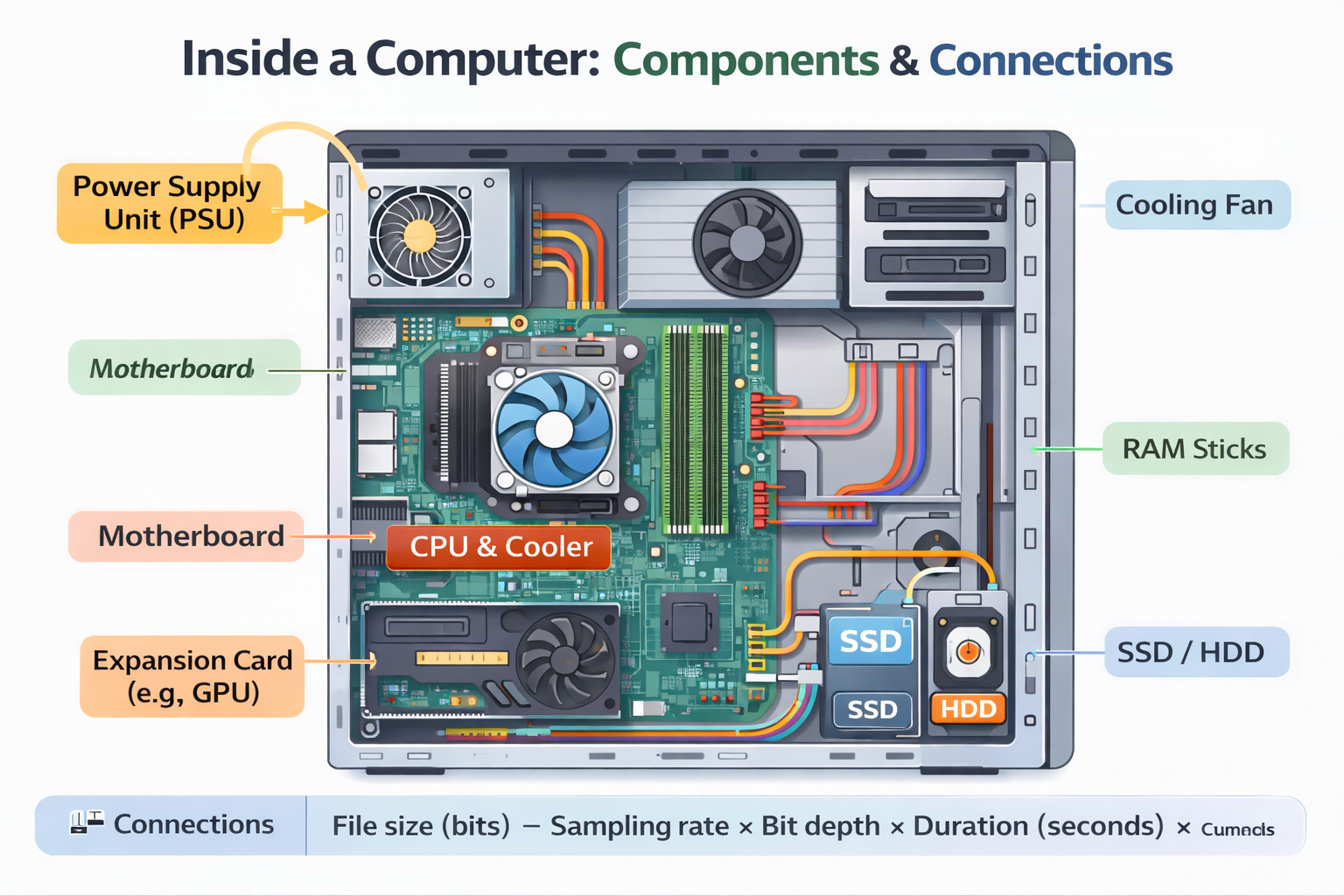
CHAPTER 1 — Systems Architecture (1.1)
1.1.1 What does the CPU do?
- 2.1 Algorithms
- 2.2 Programming Fundamentals
- 2.3 Producing Robust Programs
- 2.4 Boolean Logic
- 2.5 Programming Languages and Integrated Development Environments (IDEs)
CHAPTER 1 — Systems Architecture (1.1)
1.1.1 What does the CPU do?
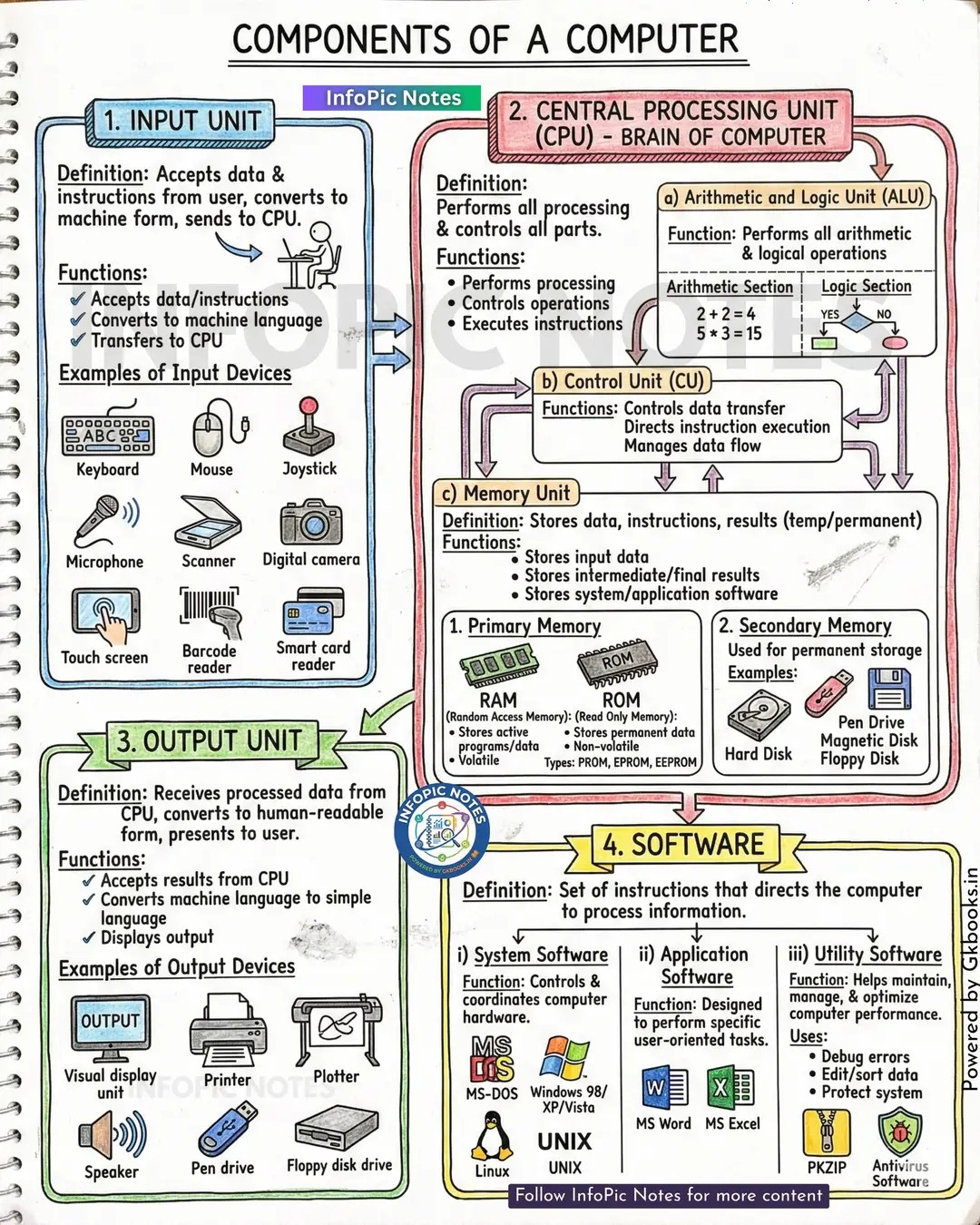
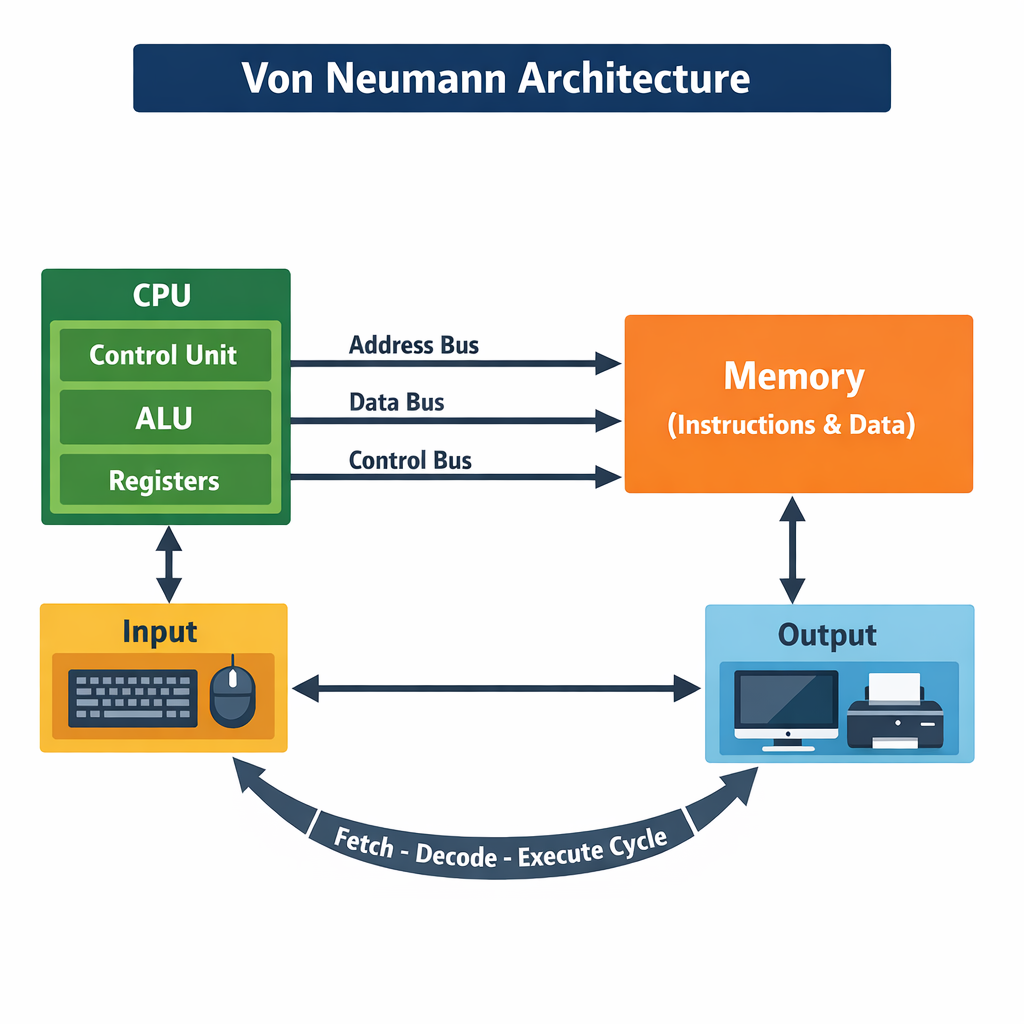
The Central Processing Unit (CPU) is the part of a computer that processes instructions and controls most of what the system does. Whenever you run a program (a game, a web browser, or background operating system tasks), it is converted into a sequence of instructions that the CPU can understand. The CPU follows a repeating process: it fetches the next instruction from memory, decodes what it means, and executes it. This continuous fetch–decode–execute cycle is the foundation of how computers run software.
At GCSE level, it is essential to understand that the CPU does not “think” — it follows rules. The instructions are stored in memory in a pattern of bits, and the CPU interprets them as operations like “load”, “store”, “add”, “compare”, and “jump”.
1.1.2 The Von Neumann Model (OCR key idea)
Most computers follow the Von Neumann architecture. The central idea is simple but powerful: program instructions and data are stored in the same memory. This means:
- Programs can be changed easily (software is stored like data).
- The CPU can treat instructions and data in similar ways (both are binary).
- It enables general-purpose computers (one machine can run many programs).
A common exam phrase is “stored program concept”. If asked what this means, say: instructions are stored in memory and fetched for execution.
1.1.3 CPU Components
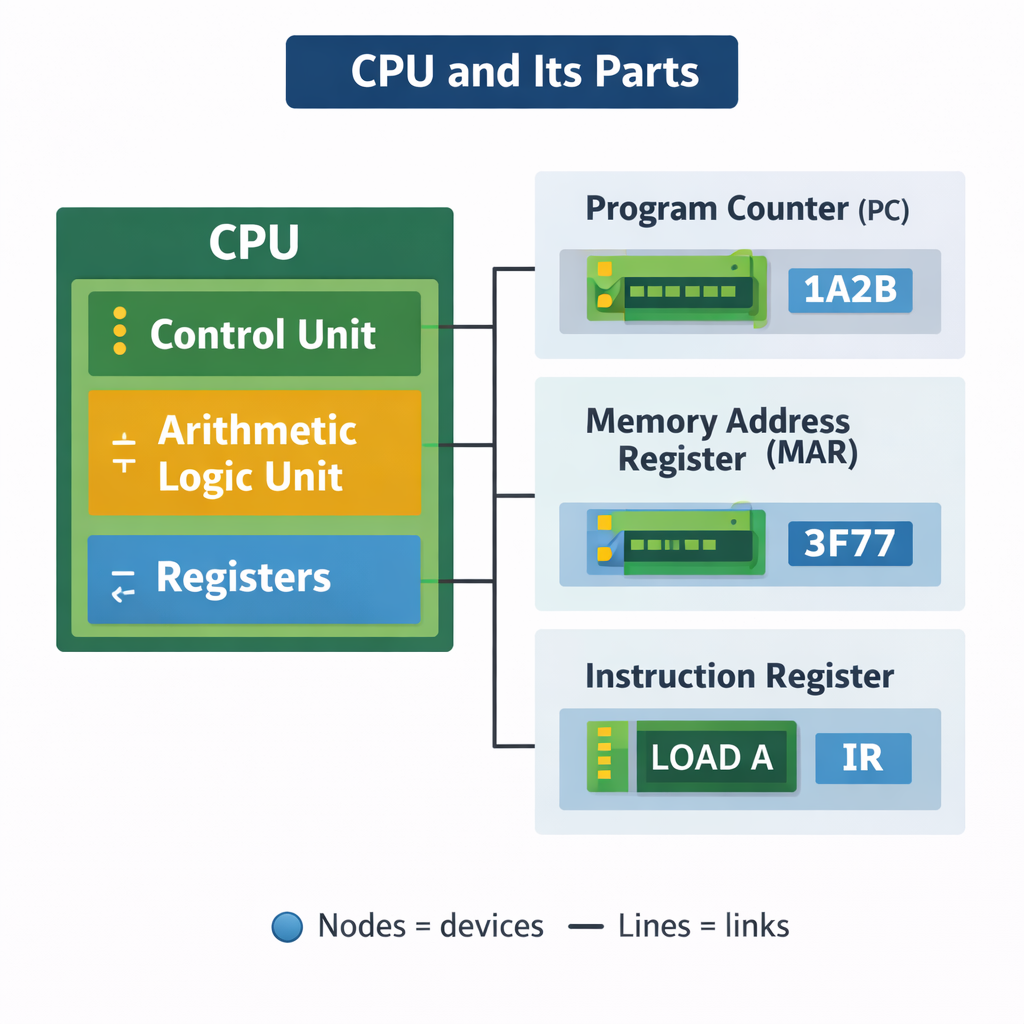
Control Unit (CU)
The Control Unit manages the execution of instructions. It sends signals around the CPU and to other hardware to coordinate tasks. Think of it as a “traffic controller”: it decides what happens next, when memory is read, when registers update, and when data is moved.
Arithmetic Logic Unit (ALU)
The ALU performs calculations and logical decisions. It handles arithmetic (addition, subtraction) and logic (AND, OR, NOT, comparisons). When you do a calculation in a program, the ALU is involved.
Registers (high-speed internal memory)
Registers are very small storage locations inside the CPU. They are much faster than RAM. OCR exam questions love registers because they show you understand how data moves during the fetch–decode–execute cycle.
1.1.4 Key Registers (You must memorise these)
- Program Counter (PC) — holds the address of the next instruction.
- Memory Address Register (MAR) — holds the address in memory being accessed.
- Memory Data Register (MDR) — holds the data/instruction being transferred to/from memory.
- Current Instruction Register (CIR) — holds the current instruction being decoded/executed.
- Accumulator (ACC) — stores intermediate results from the ALU.
Common mistake: students say MAR “stores data”. MAR stores an address. MDR stores the data.
1.1.5 The Fetch–Decode–Execute Cycle (step-by-step)
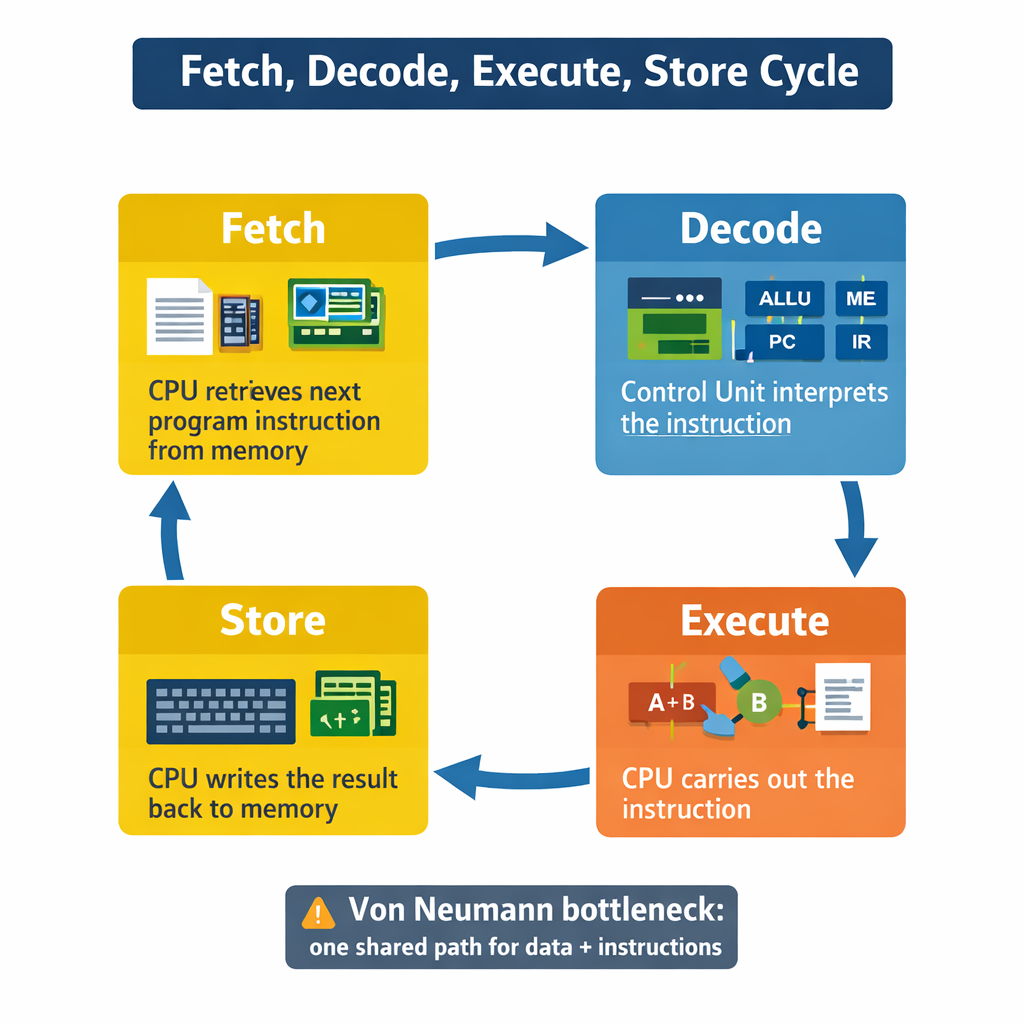
The CPU processes instructions in a repeated cycle. OCR expects you to describe this clearly using the registers. A high-mark answer includes the register names and what is transferred.
- Fetch: The address in the PC is copied to the MAR.
- The control unit sends a “read” signal to memory.
- The instruction at that address is copied from memory into the MDR.
- The instruction is copied from MDR to CIR.
- The PC increments (so it points to the next instruction).
- Decode: The control unit decodes the instruction in the CIR (works out what it means).
- Execute: The instruction is carried out (ALU operation, memory access, jump, output, etc.).
Worked Example (FDE in words)
Imagine the next instruction is “ADD 7 to accumulator”. The CPU fetches the instruction, decodes that it is an ADD, then executes it by sending the values to the ALU. The result goes back into the accumulator.
1.1.6 Performance Factors: why some CPUs are faster
Clock Speed
Clock speed is measured in Hertz (Hz). A faster clock speed means more cycles per second. However, clock speed alone is not everything because some CPUs do more work per cycle than others.
Number of Cores
A CPU has multiple cores on it. CPUs with multiple cores have more power to run multiple programs at the same time. A core is like an independent processing unit inside the CPU. Multi-core CPUs can do tasks in parallel. This improves performance when software is designed to split work (e.g., gaming, video editing). However, doubling cores does not double clock speed as the processing cannot always be easily divided between cores so there is some inefficiency. Some headroom is needed to communicate between each core.
Cache Size
Cache is small, very fast memory but expensive and is used to store frequently accessed instructions/data. If the CPU can get what it needs from cache instead of RAM, performance improves because RAM is slower. Transferring data in and out of memory takes much, much longer than from cache. Therefore, placing frequently accessed data in the cache results in everything using that function (such as square roots) being executed much faster. The more cache there is, the more data can be stored closer to the CPU. CPU cache is ‘graded’ at different levels depending on its speed. L1 is usually part of the CPU chip and is both the smallest and the fastest to access. Its size is often restricted to between 8 KB and 64 KB. L2 and L3 caches are bigger than L1. They are extra caches built between the CPU and the RAM. Sometimes L2 is built into the CPU with L1. L2 and L3 caches take slightly longer to access than L1. Each CPU core has its own set of L1 cache, but they can share higher levels. Cache is very expensive and is limited by the space of the CPU die, and is very small, so cannot be a full replacement for memory.
OCR Exam Technique (3–6 markers)
- Always explain the mechanism: “cache reduces time waiting for RAM”.
- Include limitations: “multi-core only helps if the program can use parallel processing”.
- Use correct terms: clock speed, cores, cache.
CHAPTER 2 — Memory & Storage (1.2)
2.1 Primary Storage (RAM, ROM, Cache)
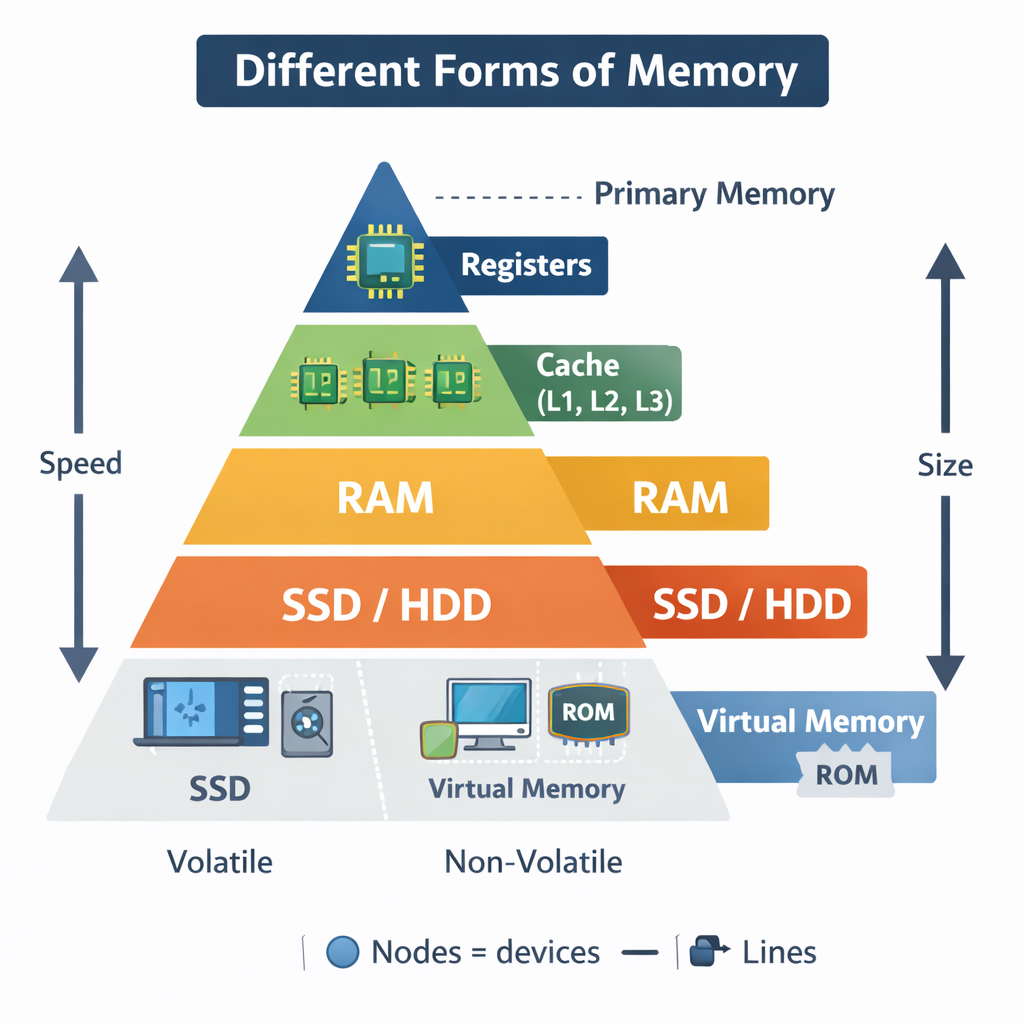
Primary storage consists of RAM (random access memory) and ROM (read-only memory). ROM is non-volatile (retains its data after being powered off) and is now often only used to boot the computer, providing the BIOS or UEFI start-up instructions. Memory/RAM is small in size compared to secondary storage, but is much faster as it does not have moving parts or have to retain that much information. It is usually from 4-32GB in size and is constantly growing (My first computer it was 1 Lb then eventually 4 MB and now 16GB). The more RAM a computer has, the more programs and instructions it can store simultaneously.
RAM (Random Access Memory)
RAM is volatile, meaning it loses its contents when power is turned off. RAM stores the programs and data currently in use. If you open a game, it loads into RAM so the CPU can access it quickly.
“Random access” means the CPU can access any memory location directly without reading earlier ones first.
ROM (Read Only Memory)
ROM is non-volatile. It stores the boot program (firmware) that starts the computer. When you power on a machine, it uses ROM instructions to check hardware and begin loading the operating system.
Cache
Cache stores frequently used data/instructions close to the CPU. It reduces the time the CPU waits for RAM. Cache memory is incredibly fast but relatively expensive RAM located within the CPU itself, used for very common operations and calculations that may need to be immediately reused. There are typically 3 levels of cache - L1, L2 and L3 - which go down (starting from L1) in cost and speed, but up in capacity. As it is located on the CPU itself, it’s much faster than having to go to RAM all the time.
2.2 Virtual Memory (OCR extension area)
Virtual memory is a technique that uses secondary storage (like an SSD/HDD) to act like extra RAM when there is overflow from available RAM. If RAM is full, the operating system moves “pages” of data that are not currently needed to disk. When RAM is full, data which would have gone to memory instead goes to an area of the disk drive and, when needed by the CPU, is moved back into RAM. However, virtual memory is much slower than primary storage media, even if it uses the fastest SSDs, let alone HDDs with their moving parts, so the OS always attempts to avoid placing highly-used programs in virtual memory. More RAM = always better. Apart from its costs.
- Advantage: allows larger programs / more programs to run.
- Disadvantage: disk is much slower than RAM → performance drop.
- Key term: thrashing (constant swapping, system becomes very slow).
2.3 Secondary Storage
Secondary storage is non-volatile and so stores the data when the computer is off and is used for long-term storage of files and programs. OCR expects you to compare different storage types. An HDD (magnetic) has very high capacity and involves flipping magnetic polarity to store bits. It is slow to access as there are moving parts such as the read and write head. These are generally the cheapest form of bulk storage but have moving parts, so not good for portability. An SSD (solid state) has high capacity and involves trapping electrons to store bits. They are extremely fast to access, but significantly more expensive than HDDs. As solid state media has no moving parts, they are faster and much more portable than hard drives. A USB drive (also solid state) is tiny in comparison but very portable so is useful for transferring files between people and their computers. Optical storage devices like CDs and DVDs use a laser to scan the tracks, and when light reflects back, it will either reflect from ‘lands’ - representing 1, or not reflect in ‘pits’ - representing 0. Speeds and capacity are generally worse than HDDs or SSDs, but they are cheap to produce. Embedded systems may not need these as the instructions to run them are usually in ROM. For example, a watch does not need to edit the time as it runs all the time.
| Storage | How it works | Speed | Cost per GB | Durability | Typical Use |
|---|---|---|---|---|---|
| HDD | Magnetic spinning platters + read/write head | Medium/slow | Low | Can be damaged by knocks | Large file storage, budget PCs |
| SSD | Flash memory (no moving parts) | Fast | Higher | More shock-resistant | Laptops, fast boot drives |
| Optical (CD/DVD/Blu-ray) | Laser reads pits/lands | Slow | Low | Scratches easily | Media distribution, backups |
| Magnetic Tape | Magnetic strip, sequential access | Very slow access | Very low | Good for long-term storage | Backups, archives |
Exam trap: Tape is cheap and good for backups, but it is sequential access so retrieving a specific file is slow.
CHAPTER 3 — Data Representation (1.2 + Paper 2 support)
3.1 Why everything is stored in binary
Computers use binary because electronic circuits can be reliably in two states: on/off, high/low voltage. A bit is a single binary digit. A byte is 8 bits. Larger units:
- 1 KB = 1024 bytes
- 1 MB = 1024 KB
- 1 GB = 1024 MB
- 1 TB = 1024 GB
3.2 Converting Denary to Binary (method)
Use place values: 128 64 32 16 8 4 2 1 (for 8 bits).
Worked Example: 156 in 8-bit binary
156 = 128 + 16 + 8 + 4
So bits: 128(1) 64(0) 32(0) 16(1) 8(1) 4(1) 2(0) 1(0)
156 = 10011100
3.3 Binary Addition + Overflow
Rules:
- 0+0=0
- 0+1=1
- 1+1=10 (carry 1)
Worked Example: 1011 + 1101
   1011
 + 1101
 =11000
If your system only stores 4 bits, the result would overflow (because 11000 needs 5 bits). OCR expects you to state that overflow means the value is too large to store in the available bits, causing incorrect results.
3.4 Hexadecimal (base 16)
Hex is used as a shorthand for binary. One hex digit represents 4 bits (a nibble).
| Hex | Binary |
|---|---|
| 0 | 0000 |
| 1 | 0001 |
| 2 | 0010 |
| 3 | 0011 |
| 4 | 0100 |
| 5 | 0101 |
| 6 | 0110 |
| 7 | 0111 |
| 8 | 1000 |
| 9 | 1001 |
| A | 1010 |
| B | 1011 |
| C | 1100 |
| D | 1101 |
| E | 1110 |
| F | 1111 |
OCR skill: converting large binary values into hex by grouping into 4s from the right.
3.5 Characters: ASCII and Unicode
Characters are stored as numeric codes. ASCII originally used 7 bits (128 symbols). Extended ASCII uses 8 bits (256). Unicode is much larger and includes symbols from most writing systems and many emojis.
Exam tip: Unicode uses more bits, so text files can become larger, but it supports more languages.
3.6 Images (Bitmap) + File Size
A bitmap image is made of pixels. Each pixel stores a colour value. Colour depth is how many bits are used per pixel.
File size (uncompressed) = width × height × colour depth ÷ 8
Worked Example
A 1920 × 1080 image at 24-bit colour:
1920 × 1080 = 2,073,600 pixels
2,073,600 × 24 = 49,766,400 bits
49,766,400 ÷ 8 = 6,220,800 bytes ≈ 5.93 MB
3.7 Sound + File Size
Sound is sampled at intervals. Each sample is stored using a number of bits. Stereo uses 2 channels.
File size = sample rate × bit depth × channels × duration
Worked Example (CD quality)
44,100 Hz × 16 bits × 2 × 60 seconds = 84,672,000 bits
÷ 8 = 10,584,000 bytes ≈ 10.1 MB per minute
3.8 Compression: Lossy vs Lossless
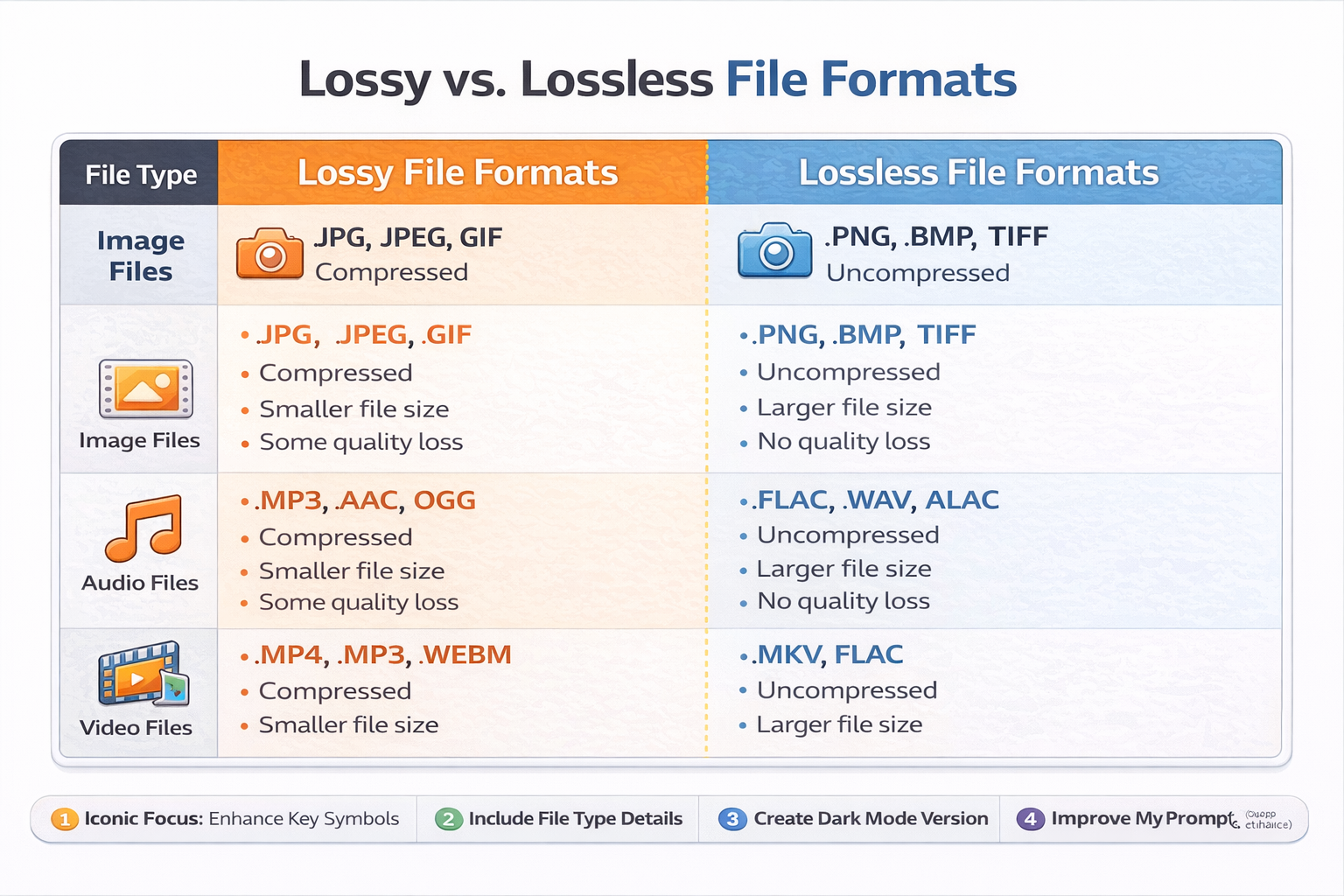
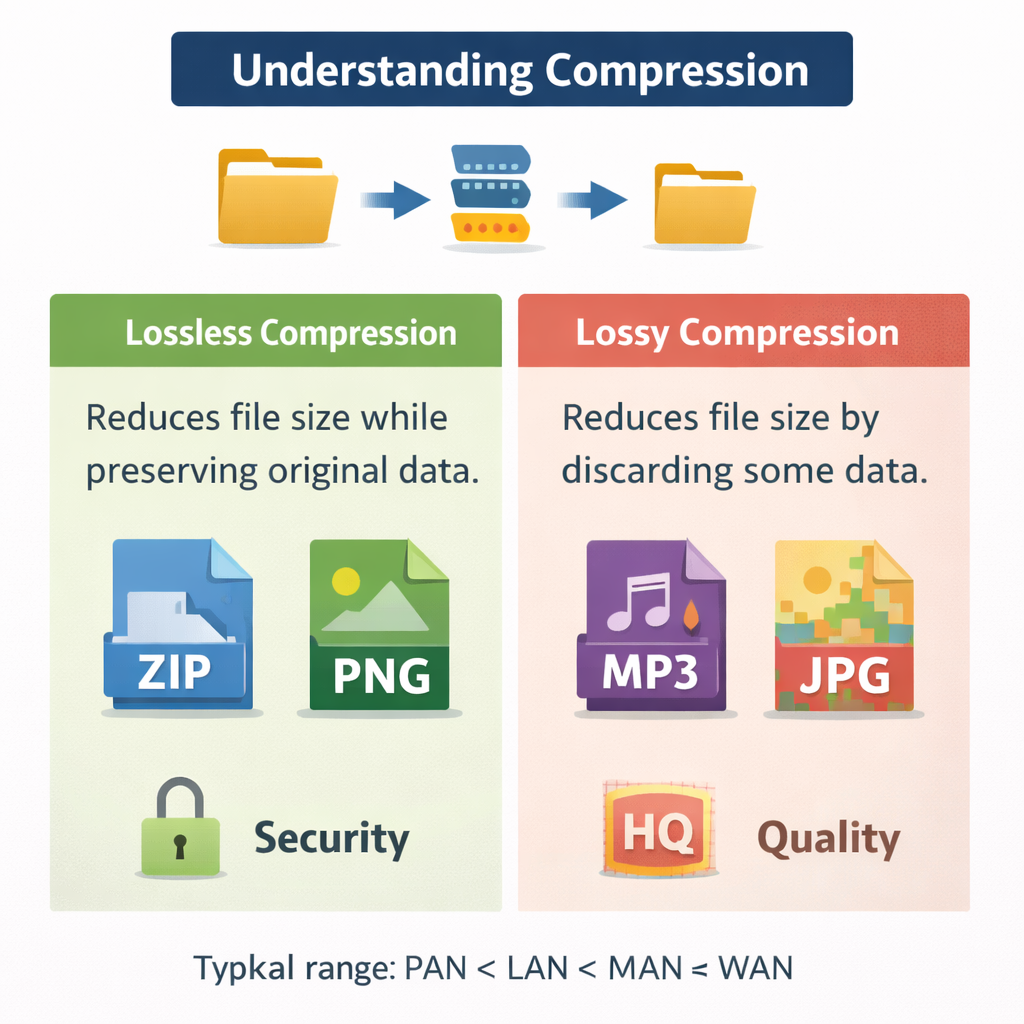
Lossless (exact)
Lossless compression reduces file size without losing any data. When decompressed, the original file is perfectly restored. This is vital for documents, program files, medical images, and anything where accuracy matters.
Run-Length Encoding (RLE) – OCR favourite
RLE compresses repeated data by storing the value and the number of repeats. Example: AAAAABBBCC → (A,5)(B,3)(C,2)
Lossy (approximate)
Lossy compression permanently removes some data that humans are less likely to notice. It achieves much smaller file sizes, which is useful for streaming music and sharing photos quickly.
End-of-Chapter Questions (OCR Style)
Chapter 1–3 Quick Check (1–3 marks each)
- State the purpose of the MAR. (1)
- State the purpose of the MDR. (1)
- Explain one advantage of cache memory. (2)
- Explain why virtual memory can slow a computer. (2)
- Calculate the uncompressed size of a 640×480 image at 8-bit colour. (3)
6-Mark OCR Style Question
Explain how the fetch–decode–execute cycle works, including the role of registers. (6)
Mark-Point Checklist (what OCR examiners reward)
- PC holds address of next instruction
- PC copied to MAR
- Memory read, instruction to MDR
- MDR copied to CIR
- Instruction decoded by CU
- Instruction executed (ALU / memory access / jump)
- PC incremented
CHAPTER 4 — Networks, Connections & Protocols (1.3)
4.1 Why networks exist
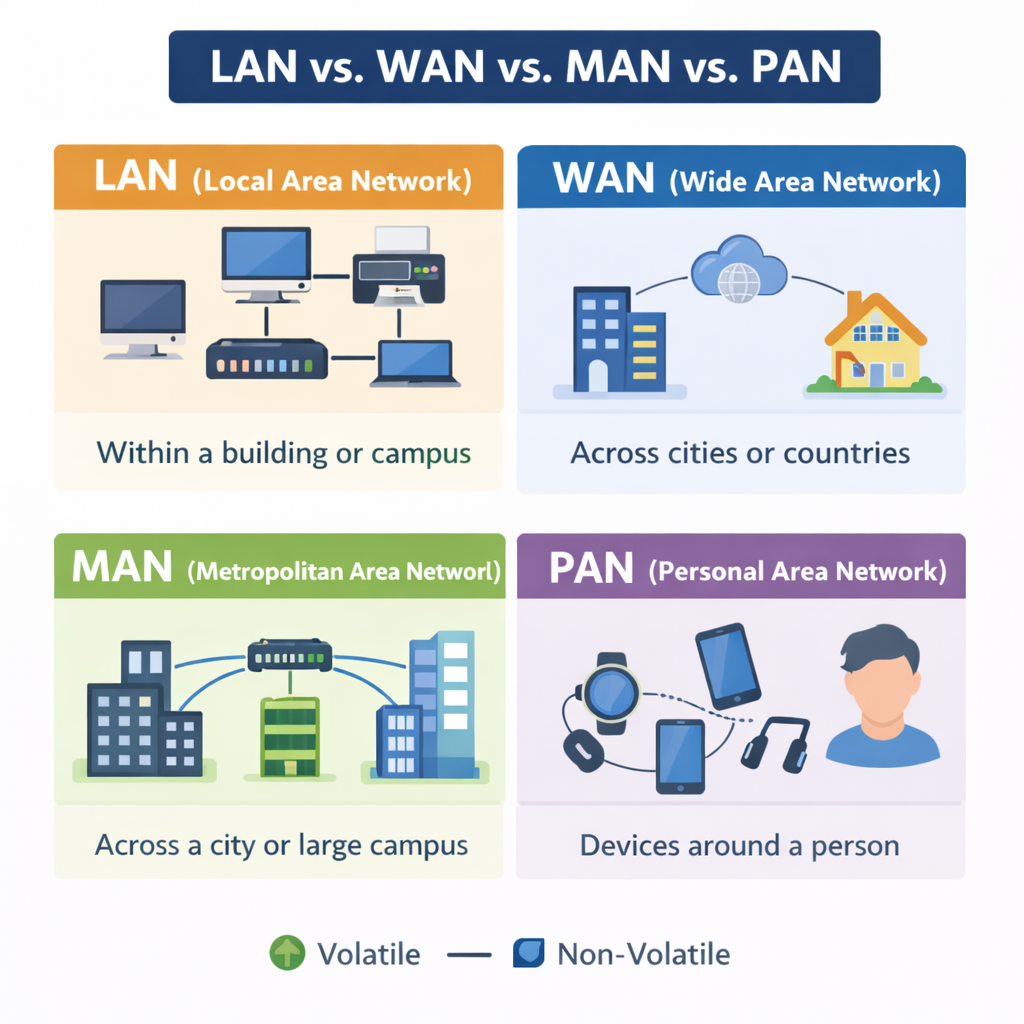
A computer network is two or more devices connected so they can share data and resources. Networks exist because sharing is efficient: schools share printers, businesses share files and databases, and the internet lets people communicate globally. In OCR questions, always include both data sharing (files, messages) and resource sharing (printers, storage, internet connection).
4.2 Types of network: LAN and WAN
LAN (Local Area Network)
A LAN covers a small area, such as a school, home, or office building. It is usually owned and managed by one organisation. LANs are typically fast (high bandwidth) and more secure because the organisation controls the devices.
WAN (Wide Area Network)
A WAN covers a large geographical area. The internet is the biggest WAN. WANs rely on third-party infrastructure (telecom companies, ISPs), so they can be slower and have higher latency than LANs.
Exam tip: LAN = local + privately managed. WAN = wide + uses external networks/ISPs.
4.3 Wired vs wireless connections
Wired (Ethernet)
Ethernet uses cables (usually copper or fibre) to connect devices. Wired connections are typically faster and more reliable than Wi-Fi because they are less affected by interference. Fibre is especially fast and suitable for long distances because it transmits using light.
Wireless (Wi-Fi)
Wi-Fi connects devices using radio waves. Its key advantage is mobility and convenience, but performance can drop with distance, walls, and interference (e.g., many devices in one area). Security is also a concern because signals can be intercepted if not encrypted.
4.4 Network hardware (OCR must-know list)
Router
A router connects networks together. In homes, the router connects your LAN to the internet (WAN). Routers use IP addresses to send data to the correct network/device. Many home routers also provide Wi-Fi.
Switch
A switch connects devices within a LAN. It sends data only to the intended device using MAC addresses, which reduces traffic compared with older hub devices.
Wireless Access Point (WAP)
A WAP allows wireless devices to connect to a wired LAN. In schools you may have multiple WAPs so coverage is strong.
NIC (Network Interface Card)
A NIC provides the physical connection to a network. It has a unique MAC address. A device may have Wi-Fi NIC, Ethernet NIC, or both.
Modem
A modem converts digital data from your network into a signal suitable for transmission over telephone lines, cable systems, or fibre networks (depending on the service). The word comes from modulator/demodulator.
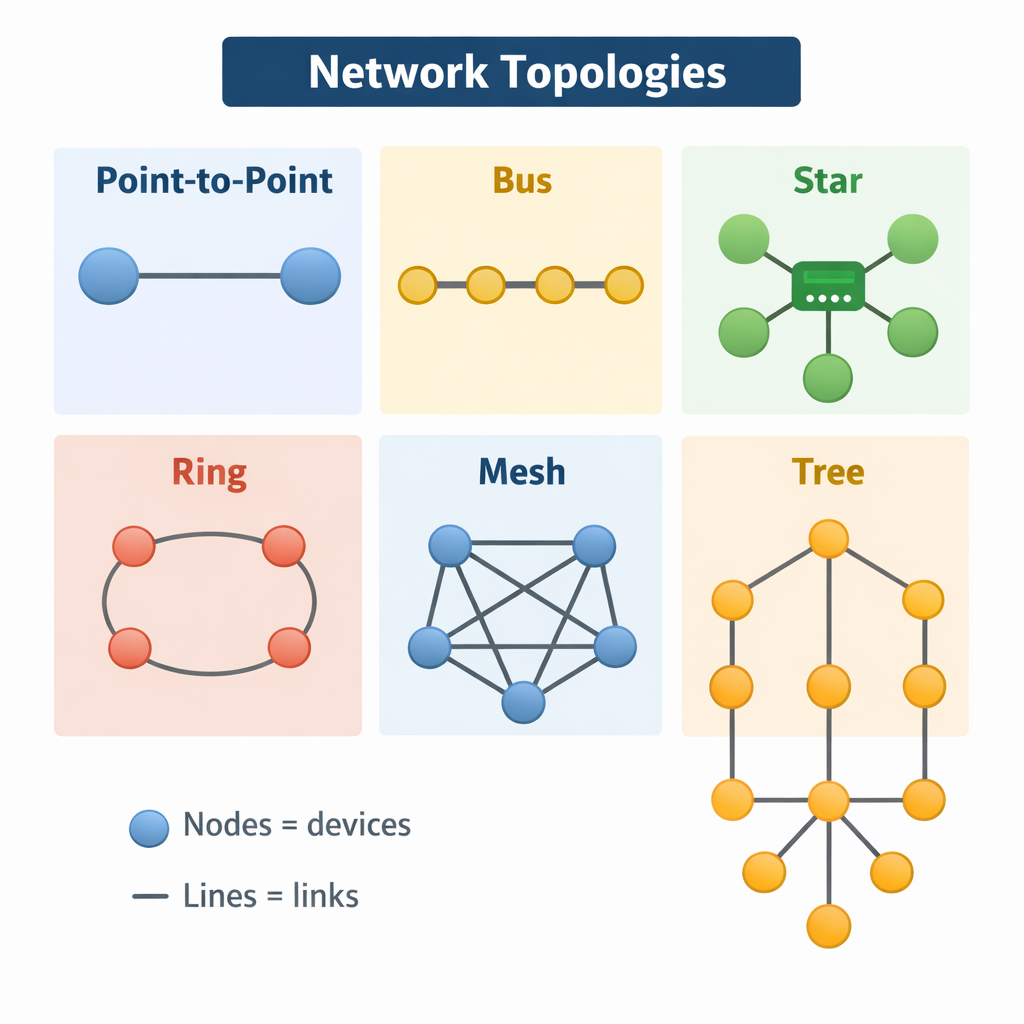
4.5 Network topologies
Star topology
In a star network, all devices connect to a central switch or hub. This is the most common modern LAN layout.
- Advantages: easy to add/remove devices; one cable/device failure does not take down the whole network; good performance with switches.
- Disadvantages: if the central switch fails, the whole network is affected; more cable needed than bus.
Bus topology
In a bus network, devices share a single backbone cable. It is rare today but still used in exam questions.
- Advantages: cheap; uses less cable.
- Disadvantages: collisions; difficult to troubleshoot; if backbone fails, the whole network fails; performance drops with more devices.
Mesh topology
In a mesh network, devices are connected to many others. Full mesh connects every device to every other device.
- Advantages: very reliable; multiple routes if one link fails.
- Disadvantages: expensive; lots of cabling; complex to manage.
OCR exam technique: For 4–6 markers, compare using the words cost, reliability, ease of maintenance, performance.
4.6 Protocols and layers
A protocol is an agreed set of rules for communication. Without protocols, devices would not know how to format messages, how to address them, or how to check for errors. Protocols allow different manufacturers’ devices to communicate successfully.
TCP/IP model (simplified GCSE version)
- Application layer: HTTP, HTTPS, FTP, SMTP, IMAP/POP, DNS
- Transport layer: TCP, UDP
- Internet layer: IP (routing and addressing)
- Link layer: Ethernet, Wi-Fi
TCP vs UDP
TCP is reliable: it uses acknowledgements and retransmission, so data arrives in the correct order. This is important for web pages, emails, and file transfers. UDP is faster but not guaranteed: it sends data without checking delivery, so it is used for live streaming and online gaming where speed matters more than perfect accuracy.
Common protocols (OCR essentials)
- HTTP/HTTPS: Used to access web pages; HTTPS uses encryption (TLS) for security.
- FTP: Transfers files (upload/download) between computers.
- SMTP: Sends email.
- IMAP/POP: Receives email.
- DNS: Converts domain names to IP addresses.
4.7 Addressing: IP and MAC
MAC Address
A MAC address is a unique identifier set on a NIC. It is used inside a LAN to deliver frames to the correct device. MAC addresses are usually fixed (though can be spoofed).
IP Address
An IP address identifies a device on a network and helps data reach the correct destination across networks. IPv4 is written as four numbers 0–255 (e.g., 192.168.1.10). IPv6 is longer and created to solve IPv4 exhaustion.
Static vs Dynamic IP
- Static: fixed address; useful for servers and printers.
- Dynamic: assigned automatically (usually by DHCP); common for home devices.
End-of-Chapter Questions (Networks)
- Explain one difference between a LAN and a WAN. (2)
- Describe the purpose of a router in a home network. (2)
- Explain why TCP is used for file transfer rather than UDP. (3)
- Compare star and bus topologies. (6)
CHAPTER 5 — Network Security (1.4)
5.1 Why security matters
Security protects systems and data from damage, theft, or misuse. OCR questions often target the CIA triad: Confidentiality (only authorised people can access data), Integrity (data is accurate and not altered improperly), and Availability (systems are accessible when needed).
5.2 Common threats
Malware
Malware is malicious software designed to harm systems or steal data. Types include:
- Virus: attaches to files; spreads when the file runs.
- Worm: self-replicates across networks without user action.
- Trojan: looks legitimate but contains malicious code.
- Spyware: monitors activity and steals information (e.g., passwords).
- Ransomware: encrypts files and demands payment for decryption.
Phishing and social engineering
Phishing uses fake emails/messages to trick users into giving passwords or clicking malicious links. Social engineering is the broader term: manipulating people rather than hacking technology. Examples include pretexting (“I’m IT support”), baiting (infected USB), and tailgating (following into a secure building).
Brute-force attacks
A brute-force attack tries many passwords until one works. Weak passwords are vulnerable, especially if there is no account lockout.
SQL injection
SQL injection occurs when a system inserts user input directly into a database query without sanitising it. Attackers can manipulate queries to access or delete data. OCR may ask you to explain how validation and sanitisation reduce this risk.
Denial of Service (DoS/DDoS)
A DoS attack overwhelms a system with traffic so it cannot respond to real users. A DDoS uses many devices (often a botnet) to make the attack more powerful.
5.3 Preventing attacks
Authentication
- Password policies: length, complexity, no common words.
- Two-factor authentication (2FA): something you know + something you have/are.
- Biometrics: fingerprint/face ID (convenient but may have false positives/negatives).
Encryption
Encryption scrambles data so only someone with the key can read it. It protects confidentiality. HTTPS uses encryption so data sent to websites cannot easily be intercepted.
Firewalls
A firewall monitors incoming/outgoing traffic and blocks suspicious connections based on rules. It can be hardware (network firewall) or software (on a device).
Penetration testing
Pen testers (ethical hackers) attempt to find vulnerabilities before criminals do. Results are used to improve security.
Software updates
Updates patch vulnerabilities. Unpatched systems are a common reason attacks succeed.
5.4 Common vulnerabilities (OCR angle)
- Weak passwords
- Outdated software
- Misconfigured permissions
- Unsecured Wi-Fi
- Human error (opening malicious attachments)
End-of-Chapter Questions (Security)
- Define malware and give two types. (3)
- Explain how a firewall helps protect a network. (3)
- Explain why encryption is important on public Wi-Fi. (4)
- Describe a SQL injection attack and one prevention method. (6)
CHAPTER 6 — Systems Software (1.5)
6.1 Operating system: what it is and why it exists
- Define malware and give two types. (3)
- Explain how a firewall helps protect a network. (3)
- Explain why encryption is important on public Wi-Fi. (4)
- Describe a SQL injection attack and one prevention method. (6)
CHAPTER 6 — Systems Software (1.5)
6.1 Operating system: what it is and why it exists
An operating system (OS) is system software that manages hardware and provides services for applications. Without an OS, users would have to control hardware directly, which is complex. The OS acts as an interface between user, applications, and hardware.
6.2 OS functions (OCR core list)
Memory management
The OS allocates RAM to programs. It keeps track of which memory locations are free or in use. With virtual memory, it also manages paging.
Process management (multitasking)
The OS manages running programs (processes). It schedules CPU time so multiple programs appear to run at once. This is done using rapid switching (context switching).
Peripheral management
The OS uses device drivers to communicate with peripherals like printers, keyboards, and screens. Drivers translate OS commands into signals the device understands.
File management
The OS organises files into folders/directories, tracks file locations, manages permissions, and handles storage devices.
User interface
The OS provides a GUI (windows, icons, menus) or a CLI (typed commands). CLI can be faster for experts and uses less memory.
Security management
The OS manages user accounts, permissions, and access control to protect data and prevent unauthorised use.
6.3 Utility software
Utility software maintains and optimises a computer system. OCR questions often ask for examples and purposes:
- Antivirus: detects and removes malware.
- Backup: copies files so they can be restored after loss.
- Disk defragmenter: reorganises files on HDD to improve speed (not needed for SSDs).
- Compression tools: reduce file size (ZIP).
- Disk cleanup: removes temporary files to free space.
- Encryption tools: protect confidentiality.
End-of-Chapter Questions (Systems Software)
- Explain two functions of an operating system. (4)
- Explain why defragmentation improves HDD performance. (3)
- Compare GUI and CLI. (6)
CHAPTER 7 — Ethical, Legal, Cultural & Environmental Impacts (1.6)
7.1 Why OCR asks “impacts” questions
Technology affects society. OCR rewards balanced answers: you must usually describe both benefits and drawbacks. High-mark responses use structure (PEEL) and apply to a scenario (e.g., facial recognition in schools, data collection by apps).
7.2 Legal issues (UK focus)
Data Protection Act 2018 and GDPR
These laws protect personal data. Organisations must collect data fairly, store it securely, and use it for stated purposes. People have rights such as access to their data and asking for correction. Data breaches can lead to fines and reputational damage.
Computer Misuse Act 1990
This law covers hacking and unauthorised access. It includes:
- Unauthorised access to computer material
- Unauthorised access with intent to commit further offences
- Unauthorised modification of data (e.g., installing malware)
Copyright, Designs and Patents Act
Protects creators. Illegal downloading and copying software/music without permission is copyright infringement.
7.3 Ethical issues
- Privacy: tracking users without clear consent.
- Bias: algorithms can discriminate if training data is unrepresentative.
- Ownership: who owns data created by users?
- Automation: job losses vs efficiency gains.
7.4 Cultural issues
- Online communities can increase inclusion, but also enable harassment.
- Digital divide: some groups lack access to devices/internet.
- Social media changes communication styles and can affect mental health.
7.5 Environmental issues
- E-waste: discarded devices contain toxic materials.
- Energy usage: data centres consume significant electricity.
- Resource extraction: rare earth metals mining impacts ecosystems.
7.6 Open source vs proprietary (OCR favourite comparison)
Open source
- Source code is available.
- Can be modified and redistributed.
- Often free; community support.
- Security can be strong because code is reviewed, but responsibility for updates varies.
Proprietary
- Source code hidden.
- Paid licences are common.
- Professional support and controlled updates.
- Users cannot legally modify or redistribute.
End-of-Chapter Questions (Impacts)
- Explain two ways GDPR affects how companies store user data. (4)
- Discuss the ethical issues of facial recognition in public places. (6)
- Evaluate the environmental impacts of upgrading smartphones every year. (8)
CHAPTER 8 — Algorithms (2.1)
8.1 What is an algorithm?
- Online communities can increase inclusion, but also enable harassment.
- Digital divide: some groups lack access to devices/internet.
- Social media changes communication styles and can affect mental health.
7.5 Environmental issues
- E-waste: discarded devices contain toxic materials.
- Energy usage: data centres consume significant electricity.
- Resource extraction: rare earth metals mining impacts ecosystems.
7.6 Open source vs proprietary (OCR favourite comparison)
Open source
- Source code is available.
- Can be modified and redistributed.
- Often free; community support.
- Security can be strong because code is reviewed, but responsibility for updates varies.
Proprietary
- Source code hidden.
- Paid licences are common.
- Professional support and controlled updates.
- Users cannot legally modify or redistribute.
End-of-Chapter Questions (Impacts)
- Explain two ways GDPR affects how companies store user data. (4)
- Discuss the ethical issues of facial recognition in public places. (6)
- Evaluate the environmental impacts of upgrading smartphones every year. (8)
CHAPTER 8 — Algorithms (2.1)
8.1 What is an algorithm?
Open source
- Source code is available.
- Can be modified and redistributed.
- Often free; community support.
- Security can be strong because code is reviewed, but responsibility for updates varies.
Proprietary
- Source code hidden.
- Paid licences are common.
- Professional support and controlled updates.
- Users cannot legally modify or redistribute.
End-of-Chapter Questions (Impacts)
- Explain two ways GDPR affects how companies store user data. (4)
- Discuss the ethical issues of facial recognition in public places. (6)
- Evaluate the environmental impacts of upgrading smartphones every year. (8)
CHAPTER 8 — Algorithms (2.1)
8.1 What is an algorithm?
An algorithm is a step-by-step method for solving a problem. A good algorithm is clear, correct, and efficient. OCR expects you to understand algorithms in pseudocode and be able to trace them.
8.2 Computational thinking
Decomposition
Breaking a big problem into smaller manageable parts (subtasks). In programming this often becomes functions/subprograms.
Abstraction
Removing unnecessary detail so you focus on what matters. For example, representing a school timetable as a set of lessons rather than the full school.
Pattern recognition
Spotting similarities with previous problems so you can reuse solutions.
Algorithmic thinking
Developing clear steps, testing them, and refining.
8.3 Representing algorithms
- Flowcharts: visual representation.
- Pseudocode: structured English close to code (OCR uses this heavily).
- Trace tables: track variable values step-by-step.
8.4 Searching algorithms
Linear search
Linear search
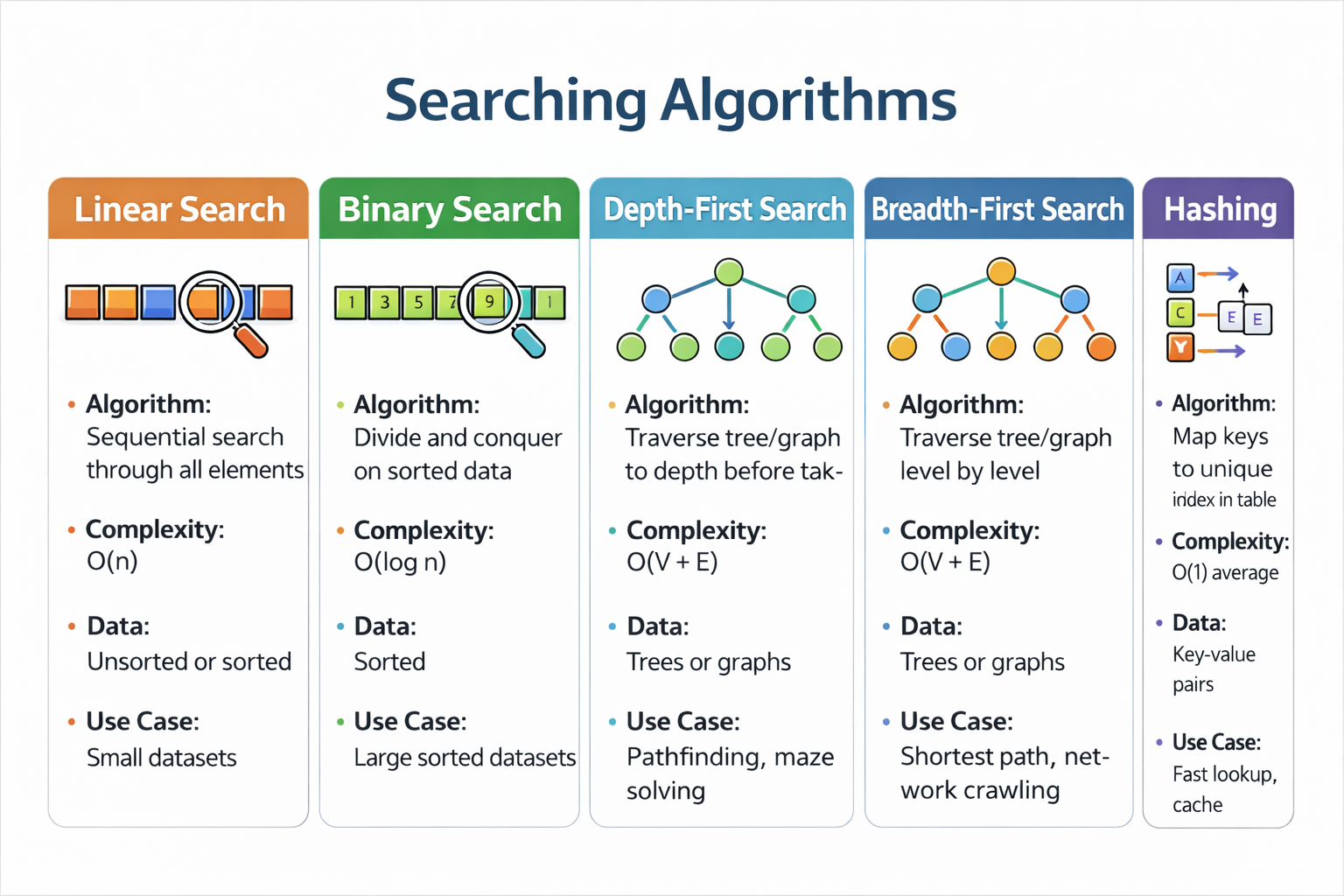
Linear search checks each item one by one until it finds a match or reaches the end. It works on any list (sorted or unsorted) but can be slow for large lists.
Binary search
Binary search repeatedly halves the search space. It is much faster but requires the list to be sorted.
Common OCR mark: “Binary search needs sorted data, otherwise it may miss the target.”
8.5 Sorting algorithms
Bubble sort
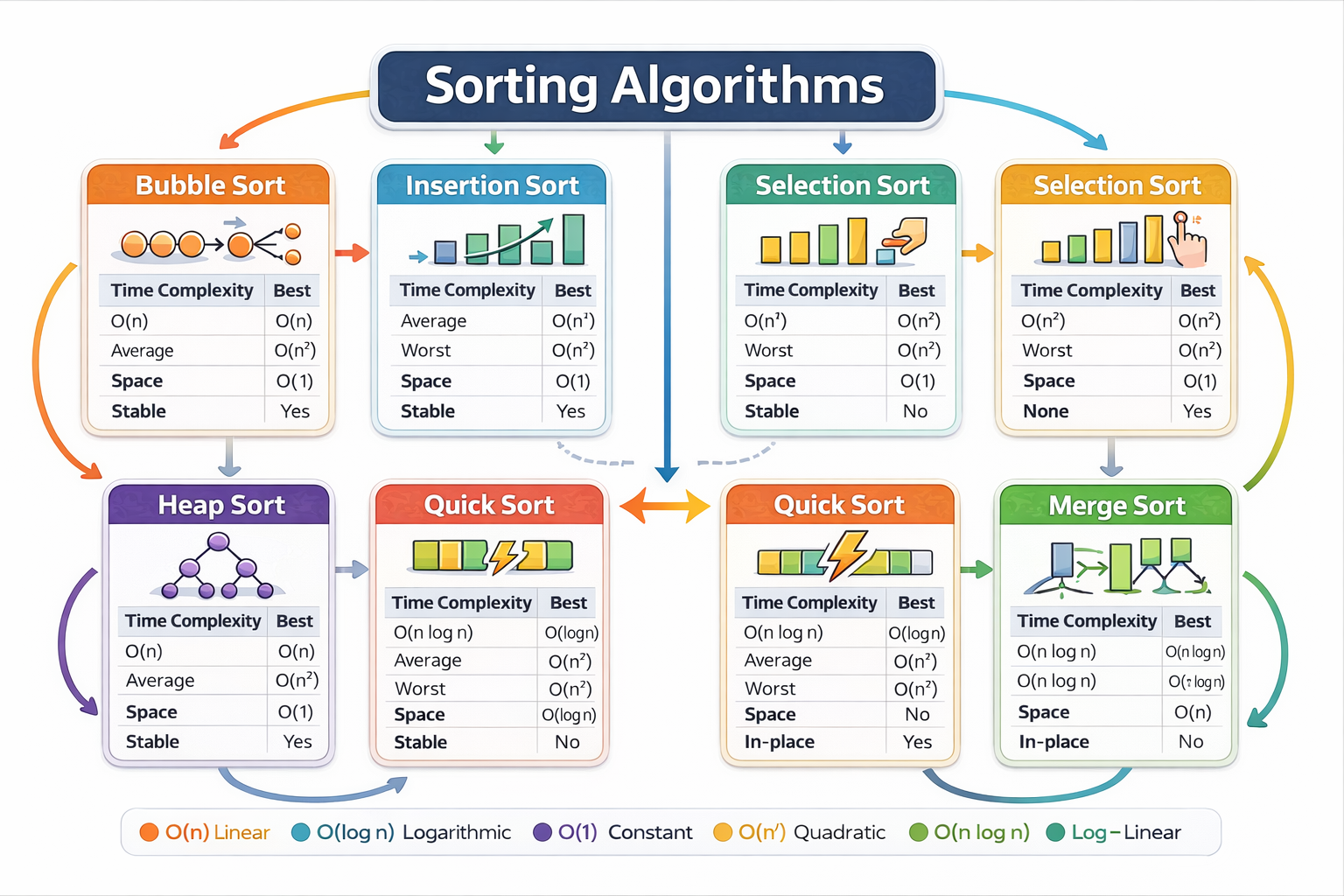
Bubble sort compares adjacent items and swaps them if they are in the wrong order. It repeats passes until the list is sorted. It is easy to understand but inefficient for large lists (O(n²)).
Insertion sort
Insertion sort builds a sorted portion gradually. Each new element is inserted into its correct position. It is fast when data is nearly sorted.
Merge sort (divide and conquer)
Merge sort splits the list into halves until single elements remain, then merges them back in sorted order. It is efficient for large lists (O(n log n)).
8.6 Efficiency (OCR basics)
Efficiency is about time and resources. OCR expects you to compare algorithms using ideas like “number of comparisons” and how performance changes as data size grows.
End-of-Chapter Questions (Algorithms)
- Explain why binary search is faster than linear search on large lists. (3)
- State one reason merge sort is more efficient than bubble sort for large datasets. (2)
- Trace the following pseudocode using a trace table. (6)
CHAPTER 9 — Programming Fundamentals (2.2)
9.1 Core programming constructs
Sequence
Sequence
Instructions executed in order.
Selection
Choosing between paths using IF statements.
Iteration
Repeating a section of code using loops (FOR, WHILE).
9.2 Data types and variables
A variable stores a value that can change. Data types include integer, real/float, Boolean, character, string. Using correct types reduces errors and improves clarity.
9.3 Operators
- Arithmetic: + - * / // %
- Comparison: == != < > <= >=
- Logical: AND OR NOT
9.4 Strings (OCR practical skills)
Strings are sequences of characters. Common operations include length, slicing, concatenation, and searching.
name = "Alice Smith"
print(len(name))        # 11
print(name[0:5])        # Alice
print("Smith" in name)  # True
9.5 Arrays and 2D arrays
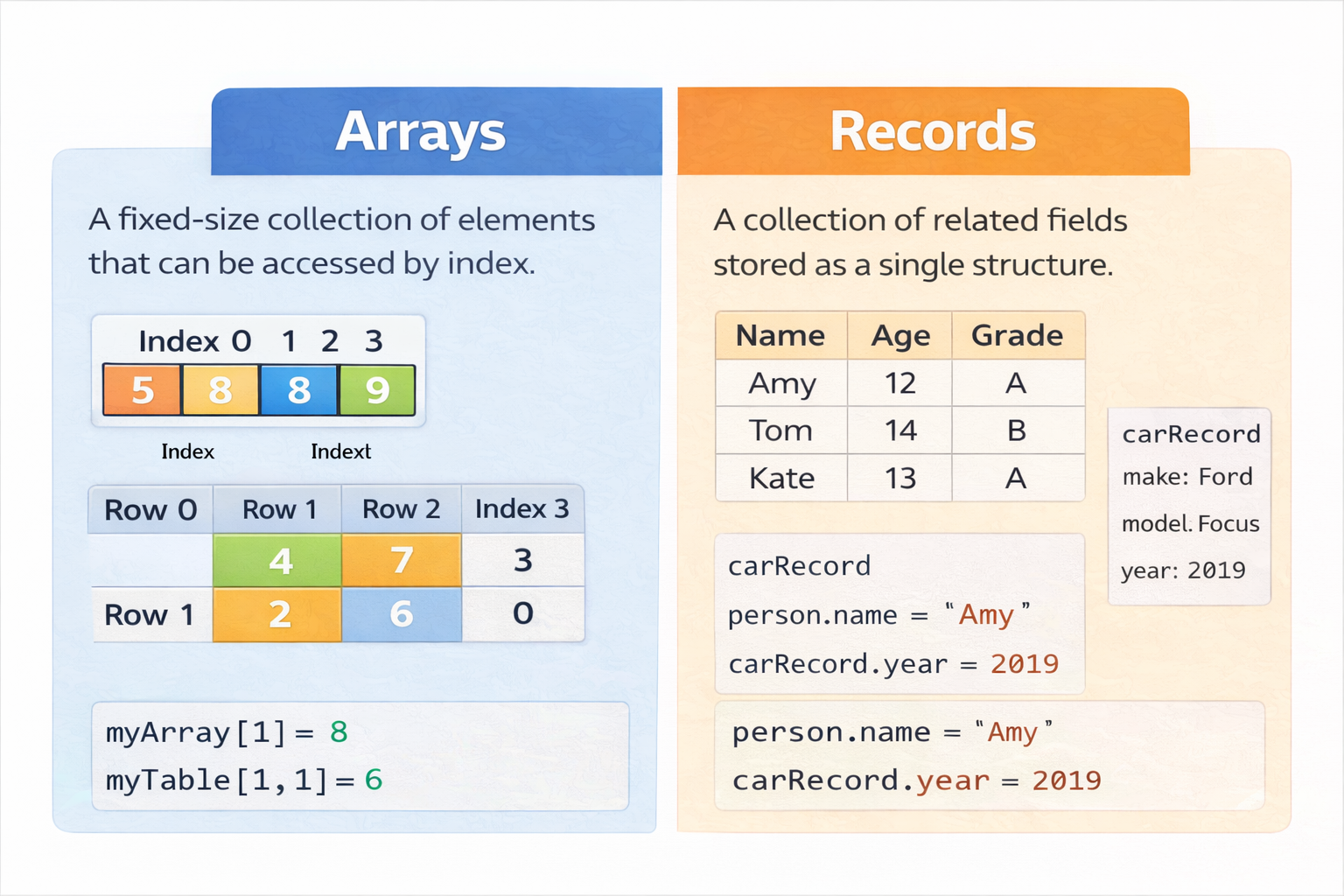
An array stores multiple values under one name. A 2D array is a table (rows and columns). OCR sometimes uses 2D arrays for game boards or seating plans.
board = [
  ["X","O"," "],
  [" ","X","O"],
  ["O"," ","X"]
]
print(board[1][1])  # X
9.6 Subprograms (procedures and functions)
Subprograms help manage complexity. They reduce repetition and improve maintainability. A function returns a value; a procedure does not.
9.7 SQL basics (OCR simple queries)
SQL is used to query databases. OCR expects you to read and write simple SELECT statements with WHERE and ORDER BY.
SELECT name, age
FROM students
WHERE age > 16
ORDER BY name;
End-of-Chapter Questions (Programming Fundamentals)
- Explain the difference between a procedure and a function. (2)
- Write a loop that repeats until the user enters a number 1–10. (4)
- Describe how a 2D array could represent a chessboard. (3)
CHAPTER 10 — Producing Robust Programs (2.3)
10.1 Why programs fail
Programs fail due to user input, unexpected conditions, and programmer mistakes. Robust programs are designed to handle errors safely rather than crashing or producing incorrect results.
10.2 Types of error
Syntax errors
Breaking language rules (missing colon, wrong indentation). Program will not run.
Runtime errors
Errors during execution (division by zero, file not found). Program stops unless handled.
Logic errors
Program runs but gives wrong output because the algorithm is incorrect.
10.3 Validation and authentication
Validation methods
- Range check
- Type check
- Length check
- Presence check
- Format check (e.g., email contains @)
Authentication
Checking a user is who they claim to be (passwords, biometrics, 2FA).
10.4 Testing strategies
- Normal: typical valid inputs
- Boundary/extreme: min/max values
- Invalid: wrong type, out of range
10.5 Maintainability
- Meaningful variable names
- Comments that explain why, not just what
- Modular code (subprograms)
- Constants for fixed values
- Consistent indentation
CHAPTER 11 — Boolean Logic (2.4)
11.1 Boolean values
- Meaningful variable names
- Comments that explain why, not just what
- Modular code (subprograms)
- Constants for fixed values
- Consistent indentation
CHAPTER 11 — Boolean Logic (2.4)
11.1 Boolean values
Boolean values are True or False. They are used in conditions and logic circuits.
11.2 Logic gates
- NOT
- AND
- OR
- XOR
- NAND
- NOR
11.3 Truth tables (how to answer OCR questions)
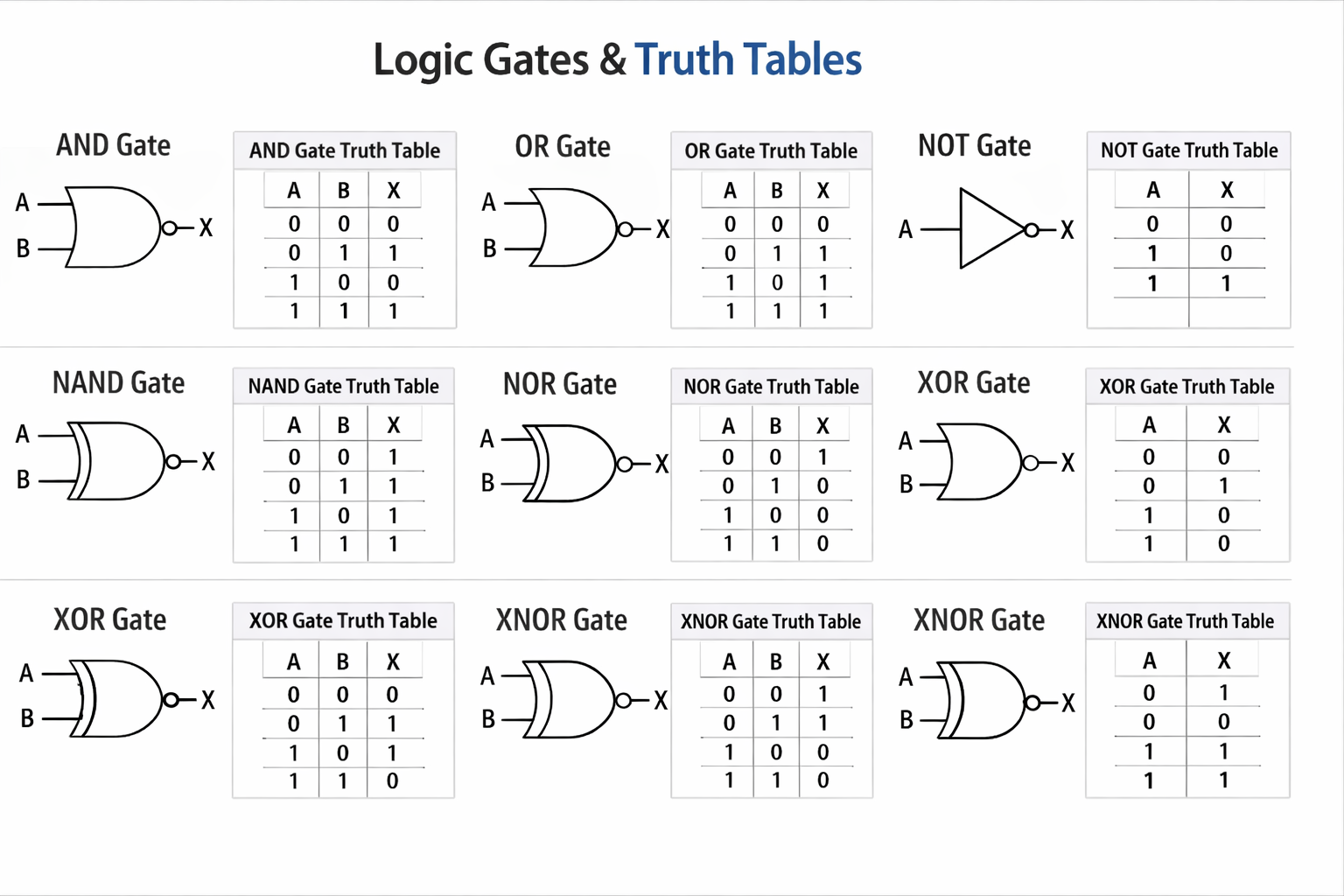
A truth table lists every possible input combination and the output. For two inputs A and B, there are 4 combinations: 00, 01, 10, 11.
XOR outputs True only when inputs are different.
End-of-Chapter Questions (Boolean)
- Complete the truth table for A NAND B. (3)
- Explain why NAND is called a universal gate. (2)
- Design a logic circuit that outputs 1 only when both inputs are the same. (6)
CHAPTER 12 — Programming Languages & IDEs (2.5)
12.1 Levels of programming language
Machine code
Machine code
Binary instructions executed directly by the CPU. Fast but difficult for humans.
Assembly language
Low-level language using mnemonics. Needs an assembler. Easier than machine code but still hardware-specific.
High-level languages
Closer to English and portable. Examples: Python, Java, C#. Need translators to run.
12.2 Translators
Compiler
Translates the entire program into machine code before running. Produces an executable. Errors shown after compilation. Often faster at runtime.
Interpreter
Translates and runs line-by-line. Errors appear as soon as the faulty line is reached. Often easier for debugging.
Assembler
Translates assembly language into machine code.
12.3 IDE features
- Code editor with syntax highlighting
- Auto-complete
- Debugger and breakpoints
- Error diagnostics
- Run/build tools
End-of-Chapter Questions (Languages/IDEs)
- Compare a compiler and an interpreter. (6)
- Explain two benefits of using an IDE. (4)
FINAL WHOLE-COURSE PRACTICE (OCR STYLE)
Mixed short questions (1–3 marks)
- State the purpose of the DNS. (1)
- State one advantage of HTTPS over HTTP. (1)
- Give one example of utility software and its purpose. (2)
- Define a brute-force attack. (2)
- State one difference between RAM and ROM. (2)
6-mark questions
- Explain how a router and switch are used in a home network. (6)
- Discuss the ethical and legal impacts of a social media company collecting location data. (6)
- Explain validation and describe three validation checks for a school login system. (6)
8-mark evaluation (Paper 1 style)
- Compare a compiler and an interpreter. (6)
- Explain two benefits of using an IDE. (4)
FINAL WHOLE-COURSE PRACTICE (OCR STYLE)
Mixed short questions (1–3 marks)
- State the purpose of the DNS. (1)
- State one advantage of HTTPS over HTTP. (1)
- Give one example of utility software and its purpose. (2)
- Define a brute-force attack. (2)
- State one difference between RAM and ROM. (2)
6-mark questions
- Explain how a router and switch are used in a home network. (6)
- Discuss the ethical and legal impacts of a social media company collecting location data. (6)
- Explain validation and describe three validation checks for a school login system. (6)
8-mark evaluation (Paper 1 style)
- Explain how a router and switch are used in a home network. (6)
- Discuss the ethical and legal impacts of a social media company collecting location data. (6)
- Explain validation and describe three validation checks for a school login system. (6)
8-mark evaluation (Paper 1 style)
A school wants to replace desktop computers with tablets for all students. Evaluate this decision. Your answer should include technical, security, cost, and environmental points. (8)
Answer Structure Tips (How to hit top bands)
- 2–3 marks: define + one clear explanation
- 4–6 marks: multiple linked points + correct terminology
- 8 marks: balanced evaluation + conclusion justified by the scenario
Done. You now have the remaining chapters in full textbook style for OCR J277.